 THEREiS
Title :
Building a Home Secretary #3 - Server: The Big Picture and the Skeleton
This post is translated from the Korean original. Read in Korean →

In part 2, before opening my home server to the outside, I locked the door first. Not a single NAS port is open, Cloudflare Tunnel punches a tunnel from inside to outside, and Cloudflare Access guards the front of it. And at the end of that tunnel sat a scarecrow called whoami, which simply shows back the requests it receives.
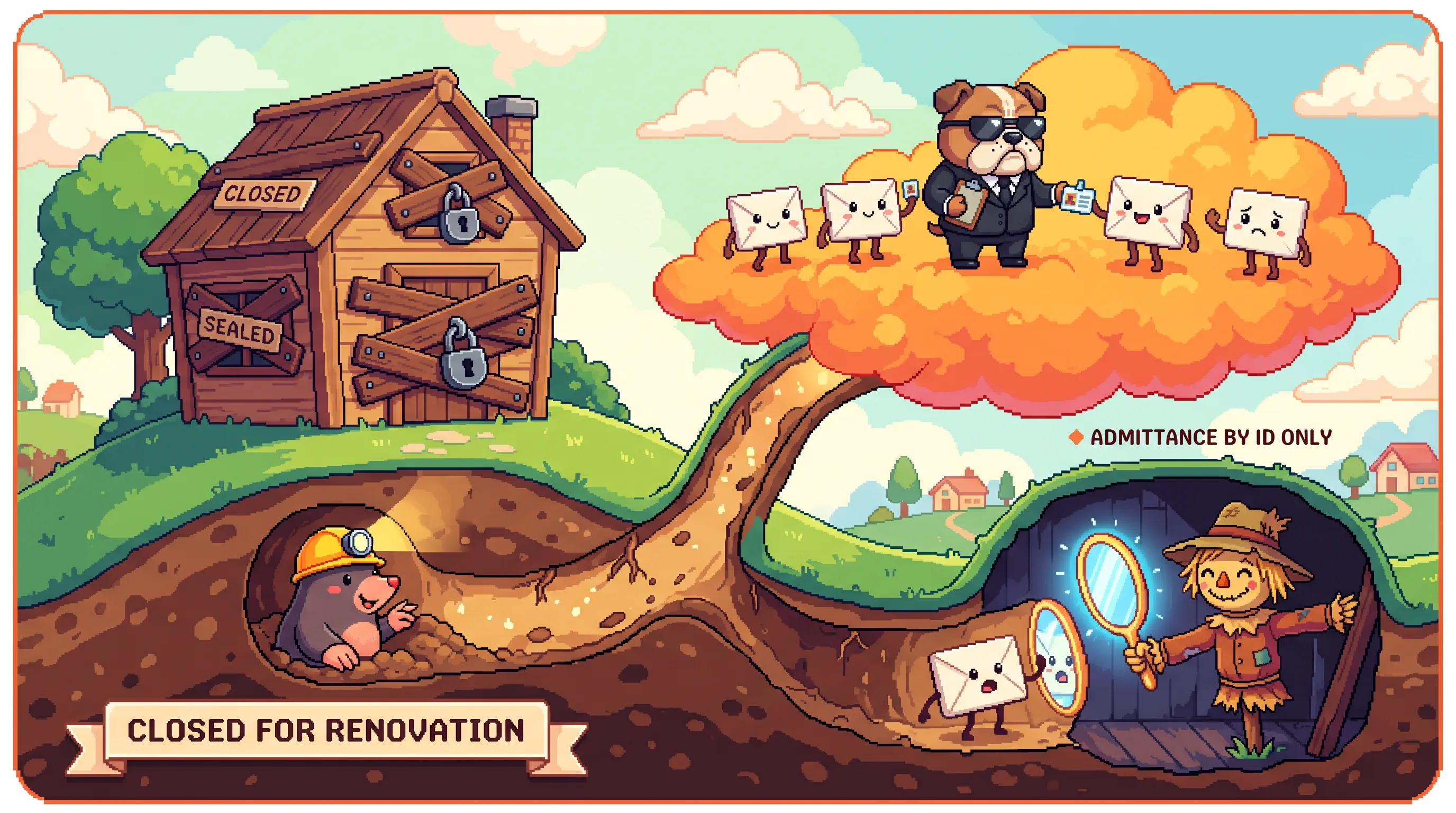
In this part, I’m finally clearing away that scarecrow and seating the real secretary, Secretary, in its place. But once I’d written it all out, there was so much code that I split the server section into eight parts so it isn’t too much to read at once. In the first four (parts 3–6), I turn the HMAC signature authentication I only designed in part 2, in other words Secretary’s gatekeeper, into real code. In the last four (parts 7–10), I build the contract between the hub and the modules, the approval queue, the audit log, and the files needed for deployment.
- 3. The Big Picture and the Skeleton
- 4. Family and Permissions
- 5. Signatures and the Gatekeeper
- 6. Family Registration and Tests
- 7. The Hub–Module Contract
- 8. Commands and the Approval Queue
- 9. Events and Fake Module Tests
- 10. Containers and Deployment Files
And while building it, a question came up. “Is this just for me? What about my wife?” So I revised the design once along the way and made it a service shared by up to 4 family members. And so I can share this source with other people later, I pulled every value that differs from home to home out of the code.
There’s quite a lot of code. Still, let’s follow along one piece at a time.

The big picture: one hub, many modules
Secretary has a lot to do. Sending email, turning bulbs on and off, sending text messages, KakaoTalk “send to me,” even summarizing conversations. Put all of that in one server and it quickly becomes a giant lump. Every time you fix one feature you have to redeploy the whole thing, and secrets like AWS keys, the Tapo account, and Kakao tokens all gather in one container. If one gets compromised, everything does.
So I drew it like this.
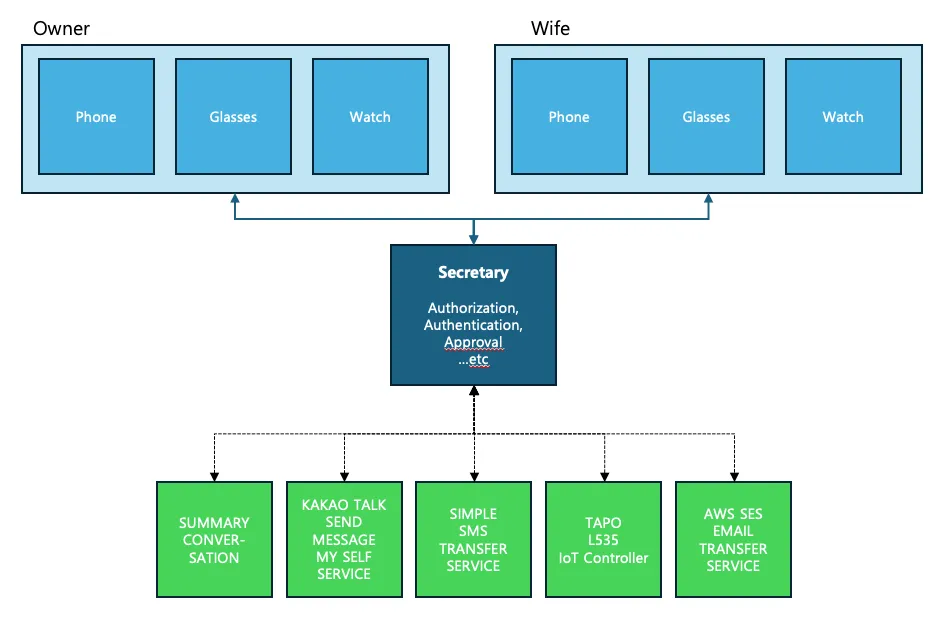
Secretary (the hub) in the middle only handles user management, approvals, granting permissions, and passing commands to modules. It doesn’t know what email is or what a bulb is. The actual work is done by the modules on the right. Each module is a container running on its own, connected to the hub only by a predefined HTTP agreement (contract). They don’t even import each other’s code. It’s what MSA calls loose coupling.
- Adding a module doesn’t touch the hub code. Attach one container, add one line of config, done.
- Secrets are scattered. The AWS key goes only into the mail module, the Tapo account only into the Tapo module. If one module is compromised, only that module’s keys are at risk.
- The client API stays the same. The app, glasses, and watch call every module through a single
POST /v1/commands. Even as modules grow, clients don’t need to be rebuilt.
Here’s a table of who handles what.
| Task | Hub | Module |
|---|---|---|
| Users, device keys, HMAC auth | O | X |
| Permission checks, approval queue | O (as the module declares) | Declares only |
| Audit log | O | Its own server log only |
| Input validation, actual execution, external service keys | X | O |
Parts 3 through 6 build the hub side, and in particular the gatekeeper that every request meets first.
What we’re building
What parts 3 through 6 build:
- HMAC request signature authentication: Each device gets its own key, and every request carries a signature. Timestamp ±60 seconds, Nonce reuse blocked, key lockout when failures pile up
- Family-based users: Three roles: admin, adult family member, and child. Devices belong to people, up to 4 people
- Scope permissions: Limit what each device, and each role, can do. Glasses can only request, the watch can only approve, children can’t approve
- User and device management CLI: Registering family members and issuing keys happen only inside the NAS
- Hub skeleton: Placeholders for the module list, command entry point, approval queue, and events (filled in starting with part 7)
Here’s the finished folder structure.
09.Secretary/├── services/│ ├── hub/ # Hub (server parts)│ │ ├── app/│ │ │ ├── main.py # FastAPI app, unified error responses│ │ │ ├── config.py # Settings (environment variables)│ │ │ ├── db.py # SQLite: Nonce, auth failures, approval queue, events│ │ │ ├── audit.py # Audit log (JSONL)│ │ │ ├── cli.py # CLI for registering users, issuing/revoking device keys│ │ │ ├── approvals.py # Approval queue│ │ │ ├── catalog.py # Module list and module calls│ │ │ ├── events.py # Stores events sent by modules│ │ │ ├── auth/│ │ │ │ ├── scopes.py # Permission scopes, roles, device presets│ │ │ │ ├── registry.py # User and device store│ │ │ │ ├── signing.py # Creating HMAC signatures│ │ │ │ └── guard.py # Gatekeeper: verifies every request│ │ │ └── routers/│ │ │ ├── system.py # GET /v1/me│ │ │ ├── commands.py # POST /v1/commands, GET /v1/modules│ │ │ ├── approvals.py # Approval list, approve, reject│ │ │ └── events.py # Receive and show events│ │ ├── tests/ # pytest (42 tests)│ │ ├── Dockerfile│ │ └── requirements.txt│ └── mail/ # First module: mail (part 12)│ ├── app/│ ├── tests/│ ├── Dockerfile│ └── requirements.txt├── docs/module-contract.md # The hub–module contract├── deploy/deploy.sh # Build/deploy script that runs on the NAS├── scripts/secretary_client.py # Example client├── docker-compose.yml├── Jenkinsfile└── .env.example(I had AI make this folder structure diagram for me. I don’t have the talent to draw something like this.)
Step 0. Why Python, and why FastAPI
I usually use Spring Boot, or these days mostly Next.js or Nest.js. But this time I chose FastAPI. The reasons are simple.
- The libraries I need to integrate with are all on the Python side. For the Tapo bulbs I’ll hook up after I get back, the unofficial
tapolibrary supports the L535, and for AWS there’sboto3. Gitea and Kakao are easy to handle in Python too. - It’s lightweight. I didn’t want to spin up a JVM for a personal server running 24 hours a day on a NAS. It uses too many resources.
- Request validation comes for free. Just declare a Pydantic model and it validates input format and length for you.
Step 1. Creating the project
First, dependencies. So each service installs only what it needs, there’s a separate requirements.txt in each service folder. Here’s the hub’s. It has only the HTTP client for calling modules (httpx), and no AWS (boto3). Only the mail module uses AWS.
fastapi==0.162.0uvicorn[standard]==0.54.0pydantic-settings==2.16.2httpx==0.28.1Test dependencies are split out separately. I separated them so test tools don’t end up in the runtime image.
-r requirements.txtpytest==9.1.1For anyone who doesn’t know how to install requirements.txt dependencies, here are the commands.
(venv) pip install -r services/hub/requirements.txt # Install app dependencies(venv) pip install -r services/hub/requirements-dev.txt # Install test dependenciesAnd the most important file: .gitignore. In the secure coding post, I said “Git never forgets.” .env and the data/ folder are blocked from getting into the repository from the start. The data/ folder holds account info, logs, DB data, and so on created by the program. It must not be exposed, so it must not be pushed to Git.
__pycache__/*.pyc.pytest_cache/.venv/.envdata/Settings come in through .env. Only the empty shell, .env.example, goes into the repository. For now it has only hub settings. Every time a module is attached, that module’s values (internal token, external service keys) get added to this file, and each container gets passed only the values it needs (the docker-compose.yml in part 10).
# Cloudflare Tunnel token (the eyJ... value you got when creating the tunnel)TUNNEL_TOKEN=
# ── Hub ────────────────────────────────────────────────# Accept only requests that went through Cloudflare Access (checks the JWT header cloudflared adds)SECRETARY_REQUIRE_CF_ACCESS=true# HMAC timestamp tolerance (seconds)SECRETARY_CLOCK_SKEW_SECONDS=60# How long an approval stays pending (seconds). Expires automatically after thatSECRETARY_APPROVAL_TTL_SECONDS=300# Maximum number of active users (per household)SECRETARY_MAX_USERS=4
Step 2. Settings (config.py)
With pydantic-settings, you can read environment variables straight into a typed settings object. I set the prefix to SECRETARY_ so they don’t get mixed up with other environment variables.
"""Hub settings. Read from environment variables starting with SECRETARY_ (or .env)."""import refrom functools import lru_cachefrom pathlib import Path
from pydantic_settings import BaseSettings, SettingsConfigDict
MODULE_NAME_RE = re.compile(r"[a-z0-9][a-z0-9-]{1,23}")# These are scope prefixes the hub uses itself, so they can't be module namesRESERVED_MODULE_NAMES = {"system", "approvals", "modules", "events"}
def _pairs(raw: str) -> dict[str, str]: """ "mail=http://a,tapo=http://b" → {"mail": "http://a", "tapo": "http://b"}. Empty items are ignored.""" out = {} for item in raw.split(","): if not item.strip(): continue name, sep, value = item.partition("=") if not sep: raise ValueError(f"Not in 'name=value' format: {item.strip()}") out[name.strip()] = value.strip() return out
class Settings(BaseSettings): """Hub settings. e.g. SECRETARY_MAX_USERS=3 → max_users = 3. Without the environment variable, the defaults below are used."""
model_config = SettingsConfigDict(env_prefix="SECRETARY_", env_file=".env", extra="ignore")
data_dir: Path = Path("/data")
# It's a service for one household, so cap the number of active users max_users: int = 4
# Authentication clock_skew_seconds: int = 60 max_body_bytes: int = 64 * 1024 require_cf_access: bool = True lockout_threshold: int = 10 # After this many failures, lockout_window_seconds: int = 300 # lock that key for this long
# Approvals approval_ttl_seconds: int = 300
# Modules (docs/module-contract.md) modules: str = "" # mail=http://secretary-mail:8080,tapo=http://secretary-tapo:8080 module_tokens: str = "" # mail=<token>,tapo=<token> module_timeout_seconds: float = 10.0
@property def db_path(self) -> Path: """SQLite file location (Nonce, auth failures, approval queue, events).""" return self.data_dir / "secretary.db"
@property def registry_path(self) -> Path: """User/device store file location. It contains device Secrets, so it's created with permissions 600.""" return self.data_dir / "registry.json"
@property def audit_path(self) -> Path: """Audit log file location.""" return self.data_dir / "audit.log"
@property def module_endpoints(self) -> dict[str, tuple[str, str]]: """Module name → (URL, token). If a name breaks the rules or a token is missing, raise an error so the server won't start at all.""" urls, tokens = _pairs(self.modules), _pairs(self.module_tokens) out = {} for name, url in urls.items(): if not MODULE_NAME_RE.fullmatch(name) or name in RESERVED_MODULE_NAMES: raise ValueError(f"Can't be used as a module name: {name}") token = tokens.get(name, "") if len(token) < 32: raise ValueError(f"Token for module {name} is missing or too short (32+ characters)") out[name] = (url.rstrip("/"), token) return out
@lru_cachedef get_settings() -> Settings: """Return the settings object. Thanks to @lru_cache, it's created only the first time and the same object is reused after that.""" return Settings()max_users sets how many active users a household can have. The default is 4. lockout_threshold and lockout_window_seconds are used for the “key lockout” coming up later. If there are 10 failures within 5 minutes, that key is blocked for a while.
modules and module_tokens are the list of modules the hub knows about. “name=URL” pairs like mail=http://secretary-mail:8080 are joined with commas. That one line is all the hub knows about mail. The token is a secret the hub and module use to verify each other, created separately for each module. If a name breaks the rules or a token is missing, module_endpoints raises an error so the server won’t start at all. Better to not start in the first place than to half-run with bad settings.
@lru_cache?The @lru_cache on top of the get_settings() function at the bottom of the code. Honestly, this was my first time seeing it too. So I’m writing it down.
@lru_cache is a caching decorator in functools, part of Python’s standard library. Put it on a function, and it remembers the function’s result, and the next time you call it, returns the remembered value instead of running the function again.
A quick detour to learn about @lru_cache
Words alone won’t make it click, so let’s run it.
from functools import lru_cache

@lru_cachedef get_settings():    print("Reading settings file...")    return {"max_users": 4}

a = get_settings()b = get_settings()c = get_settings()print(a is b is c)
$ python3 lru_demo.pyReading settings file...TrueI called it three times, but “Reading settings file…” was printed only once. That means from the second call on, it didn’t even enter the function and just returned the first result as is. The True on the last line means a, b, and c are the exact same object.
Delete that one @lru_cache line and run it again, and you get this.
$ python3 lru_demo.pyReading settings file...Reading settings file...Reading settings file...FalseIt reads fresh every time you call it, and a different object is created each time.
Why I put it on the settings
Every time you create Settings(), it reads the environment variables and the .env file, and even validates the types. But settings never change while the app is running. So you just create it once and everyone shares it.
- No rereading every time. Reading the file and validating happens only the first time.
- Settings stay unified. Wherever in the app you call
get_settings(), you get the same object. Even if someone changes an environment variable while it’s running, the settings inside the app don’t change midway.
If you’ve used Spring, it’s similar to a singleton bean created with @Configuration. The official FastAPI docs also show creating settings objects this way.
Why is it called LRU?
LRU stands for Least Recently Used. If the function has arguments, it remembers results separately per argument, and when the slots it can remember (128 by default) fill up, it throws away the one that’s gone unused the longest first. get_settings() has no arguments, so there’s only one value to remember, which means here it’s effectively used for “create it exactly once.”
Things to watch out for
Once created, it never rereads, so changes to .env don’t take effect until you restart the app. In our setup, when .env changes, deployment spins up a new container, so that’s no problem. If you ever need to clear the remembered value, call get_settings.cache_clear(). You need this kind of thing when running tests with different settings, but Secretary is built so settings can be passed in directly, like create_app(settings), so tests run without touching the cache.
Step 3. State store (db.py)
There are four things the server needs to remember.
- Nonces already used: To block replay attacks, where the same request is sent again, you have to remember Nonces that have been used once.
- Authentication failure records: To lock keys with piling failures, you have to count failures.
- Approval queue: Irreversible commands like sending email need to sit somewhere while they wait for approval.
- Module events: News that modules report (like “a Kakao notification came in”) has to be held briefly until clients pick it up.
Why the first one, Nonces, is needed is quickest to see in a picture.
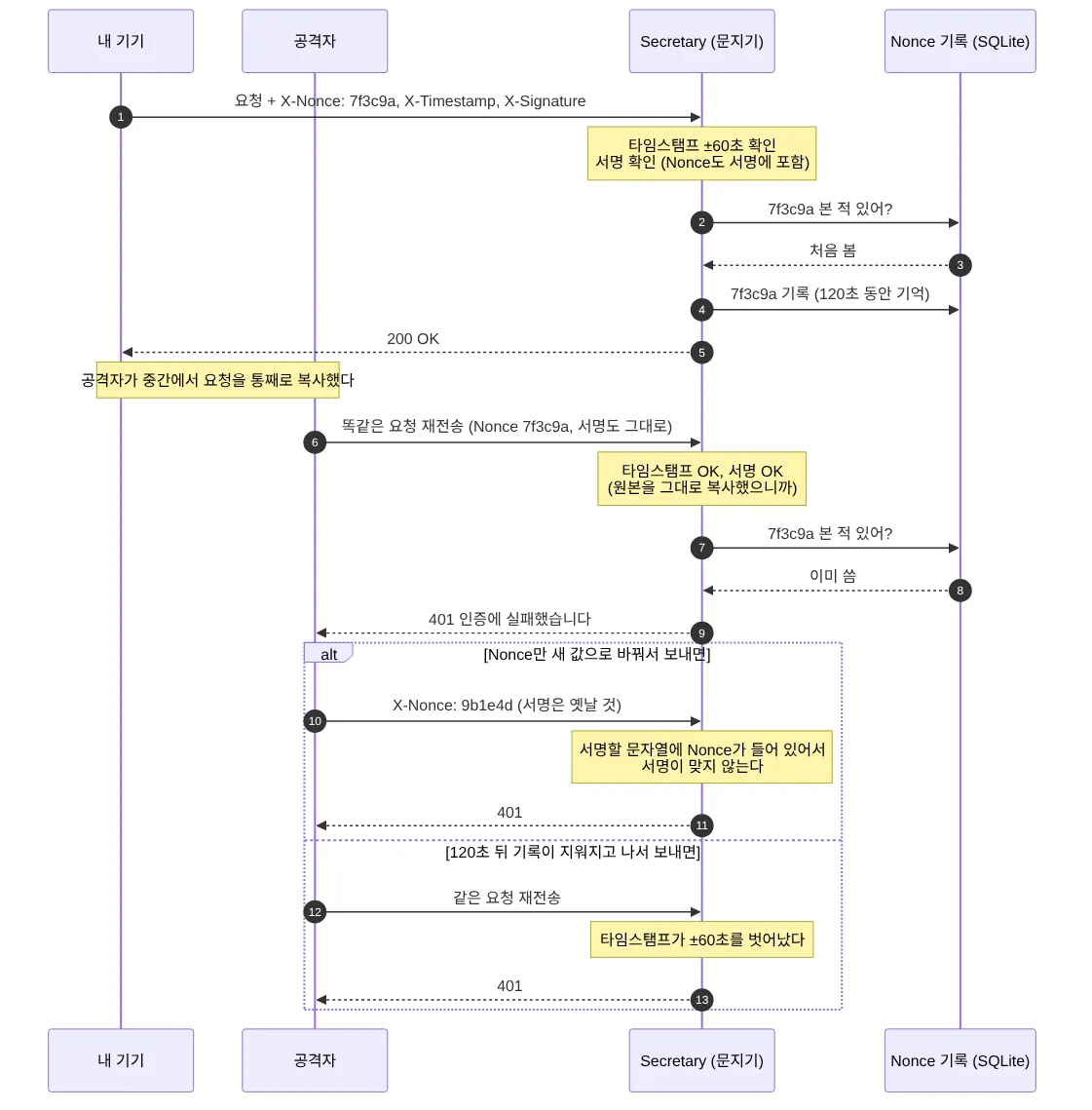
If an attacker copies my request wholesale in transit and sends it again, the timestamp and signature are both identical to the original, so both checks pass. A Nonce stops this. If you remember Nonces that have been used once, a second request with the same Nonce is blocked.
Then what if the attacker sends it with just the Nonce changed to a new value? The Nonce is part of the string to sign, so the signature breaks. What if they wait until the record is cleared and send it then? This time the timestamp falls outside ±60 seconds. So Nonces don’t need to be remembered forever, just for 120 seconds. I’ve explained it in words, but it’s complicated and hard. So I’ll go over this check order again in code with the gatekeeper in part 5. (Oh, my head.)

At first, I was going to keep Nonces only in memory. But then the memory is wiped the moment the server restarts, and for 60 seconds right after a restart, there’s no way to block the same request being sent again. So I put everything in a single SQLite file. It’s a personal server, so there’s no reason to run a separate DB server either.
"""Keep Nonce records, auth failure records, the approval queue, and module events in one SQLite file.
Run with a single uvicorn worker. That's enough for a personal server, and it lets all state live in one file."""import sqlite3import threadingfrom contextlib import contextmanagerfrom pathlib import Path
_lock = threading.Lock()
SCHEMA = """CREATE TABLE IF NOT EXISTS nonces ( access_key TEXT NOT NULL, nonce TEXT NOT NULL, expires_at INTEGER NOT NULL, PRIMARY KEY (access_key, nonce));CREATE TABLE IF NOT EXISTS auth_failures ( access_key TEXT NOT NULL, at INTEGER NOT NULL);CREATE INDEX IF NOT EXISTS idx_auth_failures ON auth_failures (access_key, at);CREATE TABLE IF NOT EXISTS approvals ( id TEXT PRIMARY KEY, action TEXT NOT NULL, payload TEXT NOT NULL, summary TEXT NOT NULL, requested_user TEXT NOT NULL, requested_by TEXT NOT NULL, rule TEXT NOT NULL, status TEXT NOT NULL, created_at INTEGER NOT NULL, expires_at INTEGER NOT NULL, decided_by TEXT, decided_at INTEGER, result TEXT);CREATE INDEX IF NOT EXISTS idx_approvals_user ON approvals (requested_user, status);CREATE TABLE IF NOT EXISTS events ( id INTEGER PRIMARY KEY AUTOINCREMENT, module TEXT NOT NULL, type TEXT NOT NULL, user TEXT, title TEXT NOT NULL, created_at INTEGER NOT NULL);CREATE INDEX IF NOT EXISTS idx_events_user ON events (user, id);"""
class Database: """Wraps a single SQLite connection. Every read/write goes through tx()."""
def __init__(self, path: Path): """Open the DB file (creating it if missing) and set up the tables.
check_same_thread=False: several threads share this one connection (concurrent access is guarded by _lock). isolation_level=None: tx() decides where transactions begin and end. WAL: a journal mode where reads aren't blocked even while writing. """ path.parent.mkdir(parents=True, exist_ok=True) self._conn = sqlite3.connect(path, check_same_thread=False, isolation_level=None) self._conn.row_factory = sqlite3.Row self._conn.execute("PRAGMA journal_mode=WAL") self._conn.executescript(SCHEMA)
@contextmanager def tx(self): """Open a transaction. COMMIT if the with block finishes cleanly, ROLLBACK if an exception is raised.
with db.tx() as c: c.execute("INSERT ...")
BEGIN IMMEDIATE takes the write lock right away, so no other request can sneak in between "read → check → write" (needed for Nonce duplicate checks and processing an approval only once). """ with _lock: self._conn.execute("BEGIN IMMEDIATE") try: yield self._conn self._conn.execute("COMMIT") except Exception: self._conn.execute("ROLLBACK") raise
def close(self) -> None: """Close the DB connection. Used at server shutdown and when the CLI briefly opens and closes it.""" self._conn.close()The reason I open transactions with BEGIN IMMEDIATE and even hold a lock is so that even if two devices press “approve” on the same approval request at the same time, the email goes out only once. And uvicorn runs with a single worker. With multiple workers, each process would have its own separate lock. For a home server used by one person, one worker is more than enough.
with and @contextmanager?The tx() in the code above is used like with self.db.tx() as c:. This with looks unfamiliar at first.
with is syntax that pairs “what to do at the start” with “what to do at the end”. If you open a file, you must close it; if you start a transaction, you must COMMIT or ROLLBACK. So you don’t forget these pairs, cleanup runs automatically when the with block ends. Even if an error happens midway.
@contextmanager lets you easily make a tool for with out of a single function. Everything before yield is “at the start,” and everything after yield is “at the end.”
from contextlib import contextmanager

@contextmanagerdef tx():    print("BEGIN")    try:        yield "conn"        print("COMMIT")    except Exception:        print("ROLLBACK")        raise

with tx() as c:    print("work:", c)
try: with tx() as c: raise ValueError("failed midway")except ValueError: print("error passed to the outside")$ python3 with_demo.pyBEGINwork: connCOMMITBEGINROLLBACKerror passed to the outsideIf the block finishes cleanly, COMMIT; if an error happens midway, ROLLBACK, automatically. That’s exactly the shape of
tx()indb.py. You can think of it as playing a role similar to Java’stry-with-resourcesor Spring’s@Transactional. By the way, thewith _lock:insidetx()works on the same principle, so the lock is released automatically when the block ends. Same goes for thewith self._lock:inregistry.pyin the next step.
To sum up
In this part, I built the hub’s skeleton.
- Structure: The hub handles only people, permissions, approvals, and passing commands. The real work is done by modules. The two are connected only by an HTTP contract
- Project: In Python and FastAPI, one hub and several modules in one repository
- Settings: Every value that differs per household goes into
.env. Only an empty shell goes in the repository - State store: Nonces, auth failures, the approval queue, and events in a single SQLite file
In part 4, I’ll decide who can do what. It started as a service just for me, but along the way it became a service for the whole family.
Bye for now!

Loading comments...