 THEREiS
Title :
Building a Home Secretary #10 - Server: Containers and Deployment Files
This post is translated from the Korean original. Read in Korean →
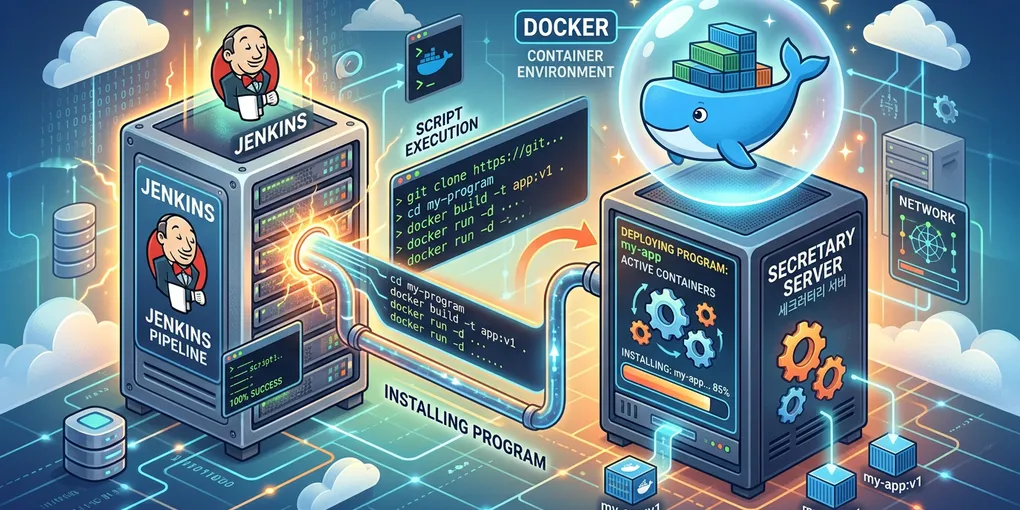
In part 9, I checked the hub end to end with a fake module. Now it’s time to put it on the NAS. This time, I make the container image, docker-compose.yml, and Jenkinsfile to get ready for deployment. There’s a long way to go. Let’s get started.
Step 1. Docker image
One image per service. Here’s the hub’s Dockerfile. I split it into three stages.
# Hub image. The build context is the repository root (because tests use the example client in scripts/).# docker build -f services/hub/Dockerfile --target runtime -t secretary .FROM python:3.13-slim AS baseENV PYTHONDONTWRITEBYTECODE=1 \ PYTHONUNBUFFERED=1 \ PIP_DISABLE_PIP_VERSION_CHECK=1WORKDIR /appCOPY services/hub/requirements.txt .RUN pip install --no-cache-dir -r requirements.txt
# Test stage: if even one test fails, the image build fails.FROM base AS testCOPY services/hub/requirements-dev.txt .RUN pip install --no-cache-dir -r requirements-dev.txtCOPY services/hub/app ./appCOPY services/hub/tests ./testsCOPY scripts ./scriptsRUN python -m pytest -q
# Runtime image: contains only the app code.FROM base AS runtimeENV SECRETARY_DATA_DIR=/dataCOPY services/hub/app ./app
# Run as a dedicated non-root user. Set the owner of the NAS data folder to this UID.RUN useradd --uid 10001 --no-create-home --shell /usr/sbin/nologin secretary \ && mkdir -p /data && chown secretary /dataUSER secretary
EXPOSE 8080HEALTHCHECK --interval=15s --timeout=3s --start-period=10s --retries=3 \ CMD python -c "import urllib.request; urllib.request.urlopen('http://127.0.0.1:8080/healthz', timeout=2)"
# One worker, because Nonces and the approval queue are managed in a single SQLite file.CMD ["uvicorn", "app.main:app", "--host", "0.0.0.0", "--port", "8080", "--workers", "1", "--no-server-header"]- base: Installs only the packages needed to run
- test: Adds test tools and test code on top of base and runs
pytest. If even one test fails, the image build itself fails. Thanks to this, the machine doing the build doesn’t even need Python. - runtime: Adds only the app code on top of base. No test code, no test tools.
The Dockerfiles for modules I build later have the same shape. For the Dockerfile, the build context is the repository root. That’s why paths are written like COPY services/hub/app ./app. It’s because the hub tests also use the example client (scripts/) at the repository root.
And it runs as the non-root secretary (UID 10001) user. Even if the app has a hole, nobody becomes root inside the container.
Don’t forget .dockerignore either. It prevents accidents where .env sneaks into the image.
.git.env.env.*!.env.exampledata__pycache__*.pyc.pytest_cache.venvThe final . in docker build ... . is the build context. The build context means the deployment path where the Dockerfile lives. You can think of it as the path of the root directory where the build starts. The ... in the middle are build options, so don’t worry about them.
Anyway, before starting the build, Docker hands this folder (the repository root, here) to the builder wholesale, and COPY in the Dockerfile is a command that can only take files from within it. To put it another way, before the build starts, Docker goes through a step of handing everything inside, relative to where the Dockerfile is, to the builder wholesale. COPY commands in the Dockerfile copy from the contents handed to the builder.
But if there are files you don’t want handed to the builder, just list them in .dockerignore in advance. .dockerignore is a list of files not to pass into the image. It’s the same as .gitignore: what you don’t push to the Git server, what you don’t feed to the builder. Files listed here never reach the builder at all, so even if someone uses COPY . . later, they can’t get into the image.
As I said, usage is almost the same as .gitignore. One pattern per line, * means any characters, and a leading ! means “don’t exclude this one.” So .env.* blocks every environment config file, and !.env.example keeps just that one file.
.gitignore keeps things out of the repository; .dockerignore keeps things out of the image. As a bonus, leaving out big folders like .git makes builds faster too.
Step 2. docker-compose.yml
I took the compose file from part 2, removed whoami, and put in the hub (secretary). There are no modules yet. I left room for modules and split the networks in advance.
# The compose file Jenkins uses to deploy. The same file is used when bringing it up by hand.## Settings are read from the .env passed with --env-file (Jenkins passes a Secret file from Credentials).# Values passed in through the shell environment during Jenkins deployment:# IMAGE_TAG First 12 characters of the Git commit hash# SECRETARY_DATA_DIR_HOST Absolute path of the data folder on the NAS (e.g. /volume1/docker/secretary/data)## The networks are split into three.# edge cloudflared ↔ hub. The only way in from outside# modules hub ↔ modules. internal: true, so this network can't reach the internet# egress Attached only to modules that need the internet (e.g. mail module → AWS SES)# Modules aren't on edge, so there's no direct path from cloudflared (= outside) to a module.## To attach a new module: add a service below, and one line each to the hub's SECRETARY_MODULES / SECRETARY_MODULE_TOKENS.# Don't touch the hub code (docs/module-contract.md).
services: cloudflared: image: cloudflare/cloudflared:latest container_name: cloudflared restart: unless-stopped command: tunnel --no-autoupdate run environment: - TUNNEL_TOKEN=${TUNNEL_TOKEN:?TUNNEL_TOKEN is required} networks: [edge]
# Hub: authentication, users, permissions, approvals, audit log, passing commands secretary: image: secretary:${IMAGE_TAG:-latest} build: context: . dockerfile: services/hub/Dockerfile target: runtime container_name: secretary restart: unless-stopped # Don't pass the whole .env with env_file. Pass each container only the values it needs. # Module secrets like the AWS key never go into the hub. environment: - SECRETARY_DATA_DIR=/data - SECRETARY_MAX_USERS=${SECRETARY_MAX_USERS:-4} - SECRETARY_REQUIRE_CF_ACCESS=${SECRETARY_REQUIRE_CF_ACCESS:-true} - SECRETARY_CLOCK_SKEW_SECONDS=${SECRETARY_CLOCK_SKEW_SECONDS:-60} - SECRETARY_APPROVAL_TTL_SECONDS=${SECRETARY_APPROVAL_TTL_SECONDS:-300} # One more line here for each module attached (part 12) - SECRETARY_MODULES= - SECRETARY_MODULE_TOKENS= volumes: - ${SECRETARY_DATA_DIR_HOST:-./data}:/data # No ports are opened to the outside. Only cloudflared, on the same network, reaches secretary:8080. read_only: true tmpfs: - /tmp cap_drop: [ALL] security_opt: - no-new-privileges:true networks: [edge, modules]
# Modules are attached below here (starting with secretary-mail in part 12)
networks: edge: name: secretary_edge modules: name: secretary_modules internal: true egress: name: secretary_egressSplitting the networks into three is the key.
| Network | What’s attached | Role |
|---|---|---|
edge |
cloudflared, hub | The way in from outside. This is the only one |
modules |
Hub, modules | Between the hub and modules. internal: true, so this network can’t reach the internet |
egress |
Only modules that need the internet | e.g. the mail module in part 12 → AWS SES |
Modules aren’t on edge, so there’s no path at all from cloudflared (that is, the outside) straight to a module. Only the hub can reach modules. Modules that don’t need the internet, like the Tapo module I’ll attach later, just go on modules.
Quite a few container security settings got attached.
- No
ports. Nobody can get in from outside, and only cloudflared on the sameedgenetwork reachessecretary:8080. read_only: true: Makes the filesystem read-only. The only places the hub can write are the/datavolume and/tmp.cap_drop: [ALL]: Drops every Linux capability. Running one web server doesn’t need any special privileges.no-new-privileges: Prevents privilege escalation inside the container.
By default, Docker networks have an open path out to the internet. That’s because Docker translates requests sent by containers to the NAS’s IP and sends them out (NAT). Add internal: true to a network and that path disappears. Containers attached to the same network can still talk to each other, but through that network they can neither go out to the internet nor be reached from outside.
So a module attached only to modules can talk only to the hub (and other modules on the same network). Even if one module is compromised, there’s no path through it to smuggle data out or download hacking tools. Containers can be attached to multiple networks at once, and if any of those networks is open to the outside, traffic goes out that way. That’s why only modules that truly need the internet, like the mail module, are also attached to egress.
Step 3. Jenkinsfile
Last is the automated deployment pipeline. Push to Gitea, and Jenkins picks it up and deploys to the NAS. My home Jenkins is a Docker container inside the NAS, so instead of Jenkins handling docker directly, it connects to the NAS over SSH and has it do the build and deploy. I’ll talk in detail about why in the deployment part.
// Secretary build/deploy pipeline//// The Jenkins container has no docker. The NAS does the build and deploy itself.//   Gitea push → webhook → Jenkins//     1) Upload  : Upload this commit's source to the NAS over SSH (git archive)//     2) Test    : Build the test image + pytest on the NAS//     3) Deploy  : On the main branch, upload .env and build, deploy, health check on the NAS (roll back to the previous image on failure)//// Required Jenkins Credentials://   nas-deploy-ssh  (SSH Username with private key) Key for the NAS's dedicated deploy account//   secretary-env   (Secret file) The entire .env file//// Values that differ per installation aren't written in the repository; they go in as Jenkins environment variables// (Manage Jenkins → System → Global properties → Environment variables, or job settings)://   SECRETARY_NAS_HOST    Required. e.g. deploy@192.168.0.10//   SECRETARY_NAS_BASE    Optional. Default /volume1/docker/secretary (src/ and data/ are created here)//   SECRETARY_NAS_DOCKER  Optional. Default docker. "sudo docker" if the deploy account isn't in the docker group
pipeline {    agent any
    options {        disableConcurrentBuilds()        timeout(time: 20, unit: 'MINUTES')        buildDiscarder(logRotator(numToKeepStr: '20'))    }
    environment {        NAS_HOST   = "${env.SECRETARY_NAS_HOST ?: ''}"        NAS_BASE   = "${env.SECRETARY_NAS_BASE ?: '/volume1/docker/secretary'}"        NAS_DOCKER = "${env.SECRETARY_NAS_DOCKER ?: 'docker'}"    }
    stages {        stage('Prepare') {            steps {                script {                    if (!env.NAS_HOST?.trim()) {                        error('Set the Jenkins environment variable SECRETARY_NAS_HOST. e.g. deploy@192.168.0.10')                    }                    env.IMAGE_TAG = sh(script: 'git rev-parse --short=12 HEAD', returnStdout: true).trim()                    currentBuild.description = "secretary:${env.IMAGE_TAG}"                }            }        }
        stage('Upload') {            steps {                withCredentials([sshUserPrivateKey(credentialsId: 'nas-deploy-ssh', keyFileVariable: 'SSH_KEY')]) {                    // Single-quoted shell script: let the shell, not Groovy, interpret the variables so secrets don't leak.                    sh '''                        SSH="ssh -i $SSH_KEY -o BatchMode=yes -o StrictHostKeyChecking=yes"                        git archive --format=tar HEAD \                          | $SSH "$NAS_HOST" "rm -rf '$NAS_BASE/src' && mkdir -p '$NAS_BASE/src' && tar -x -C '$NAS_BASE/src'"                    '''                }            }        }
        stage('Test') {            steps {                withCredentials([sshUserPrivateKey(credentialsId: 'nas-deploy-ssh', keyFileVariable: 'SSH_KEY')]) {                    sh '''                        SSH="ssh -i $SSH_KEY -o BatchMode=yes -o StrictHostKeyChecking=yes"                        $SSH "$NAS_HOST" "IMAGE_TAG='$IMAGE_TAG' DOCKER='$NAS_DOCKER' bash '$NAS_BASE/src/deploy/deploy.sh' test"                    '''                }            }        }
        stage('Deploy') {            when {                expression { env.GIT_BRANCH in ['main', 'origin/main'] }            }            steps {                withCredentials([                    sshUserPrivateKey(credentialsId: 'nas-deploy-ssh', keyFileVariable: 'SSH_KEY'),                    file(credentialsId: 'secretary-env', variable: 'ENV_FILE'),                ]) {                    sh '''                        SSH="ssh -i $SSH_KEY -o BatchMode=yes -o StrictHostKeyChecking=yes"                        # .env is sent over standard input, so no values are left on the command line or in logs. Deleted when the deploy script finishes.                        $SSH "$NAS_HOST" "umask 077 && cat > '$NAS_BASE/src/.env'" < "$ENV_FILE"                        $SSH "$NAS_HOST" "IMAGE_TAG='$IMAGE_TAG' DOCKER='$NAS_DOCKER' SECRETARY_DATA_DIR_HOST='$NAS_BASE/data' bash '$NAS_BASE/src/deploy/deploy.sh' deploy"                    '''                }            }        }    }
    post {        success {            echo "Done: secretary:${env.IMAGE_TAG}"        }    }}
I talked about Jenkins Credentials in the secure coding post, and here they are in use.
nas-deploy-ssh: The SSH key for the NAS deploy account. Retrieved withsshUserPrivateKey.secretary-env: The whole.envfile uploaded as a Secret file. It never goes into the repository.- Shell scripts in single quotes (
'''). With double quotes, Groovy interpolates secrets into the string first, which can expose them. .envis sent over SSH standard input. Passing it as a command-line argument could leave it in the process list or logs.StrictHostKeyChecking=yes. Register the NAS’s host key once at the start, and from then on it won’t connect if the server gets swapped out.- Only the
mainbranch is deployed. Other branches only run through testing. - The NAS address isn’t in the repository. Values like
SECRETARY_NAS_HOSTgo in as Jenkins environment variables. I’ll come back to this in the very next step.
The deploy/deploy.sh that the Jenkinsfile calls does the actual work on the NAS: building the test image, building the runtime image, docker compose up, and the health check, rolling back to the previous image if the health check fails. Since there are now multiple services, it keeps a list of services at the top, and tests, builds, and health-checks each one.
# Services to deploy: "folder under services/:image/container name". Add a line here too when adding a module.SERVICES=( "hub:secretary")For now there’s only the hub. Attach the mail module in part 12 and one more line, "mail:secretary-mail", gets added.
Even as modules grow, every service is deployed together with the same tag (commit hash). If even one fails its health check, they all roll back to the previous tag. .env exists only during deployment and is deleted at the end. What happened during the first deployment with this script is a story for the deployment part.
Step 4. So others can take it and use it too
Someday I’d like to share this source with other people. For that, there must not be a single value unique to my home in the repository. Here’s what I checked while tidying up.
- Secrets:
.envis blocked by.gitignore, and production values live only in Jenkins Credentials (secretary-env). - My home’s address: At first, I wrote the NAS IP directly into the Jenkinsfile. I moved it out into a Jenkins environment variable. If the value is missing, the build kindly stops.
environment {NAS_HOST = "${env.SECRETARY_NAS_HOST ?: ''}"NAS_BASE = "${env.SECRETARY_NAS_BASE ?: '/volume1/docker/secretary'}"NAS_DOCKER = "${env.SECRETARY_NAS_DOCKER ?: 'docker'}"}
- Settings that differ per household: The max number of people (
SECRETARY_MAX_USERS), the deploy path, and per-module settings (like the mail module’s recipient allowlist in part 12) are all environment variables. - Pick the modules you want: A household that doesn’t need mail just doesn’t attach the mail module. Conversely, to build and attach your own module, you just have to keep the contract in module-contract.md. No need to touch the hub code.
Honestly, once it reaches around version 1.0 and is good enough to show others, I plan to put the source in a public GitHub repository. What I run at home would be the nightly version, and what goes on GitHub would be the public version. If the Secretary server runs well, I’d like to try turning it into a platform that keeps expanding by adding more and more modules.
To sum up
Here’s what I did from part 7 up to here. That’s the hub.
- Contract: The hub and modules connect only through four endpoints:
/manifest,/actions/{action}/validate,/actions/{action}, and/healthz. Whether approval is needed and role restrictions are declared by the module and enforced by the hub - Commands: Every module through the single
POST /v1/commands. Clients stay the same even as modules grow - Approval queue: Commands a module says “need approval” are held back, and when approved, passed to the module as is
- Events: Things a module needs to report first go to
/internal/events. Blocked from outside - Approval rules: My requests are approved by my other devices, children’s requests by an admin. Other family members’ requests get 404 as if they don’t exist. Pressing twice still runs only once
- Audit log: Who (person, device) did what and when, as JSONL. Secrets and input values aren’t recorded
- Containers: Non-root, read-only, all capabilities dropped, no ports, each container gets only the values it needs. Networks are split so only the hub can reach modules
- Deployment files: Jenkins only conducts; the NAS builds it directly.
.envexists only during deployment, and failures roll back - Sharing: Values unique to my home stay out of the repository. Whoever takes it can just put in their own home’s values and it runs
The hub is now fully ready. In part 11, the deployment part, I’ll actually deploy to the NAS with these files. Then in part 12, I’ll attach the first module, mail, according to this contract. How many times I fell flat on my face without changing a single line of code is a story for then.
Bye for now!

Loading comments...