 THEREiS
Title :
Building a Home Secretary #1 - How It Started
This post is translated from the Korean original. Read in Korean →
I’m on a business trip in the US right now. I’ll be back in Korea in December, and there’s one thing I really want to buy when I get back: the Even G2 smart glasses from Even Realities.
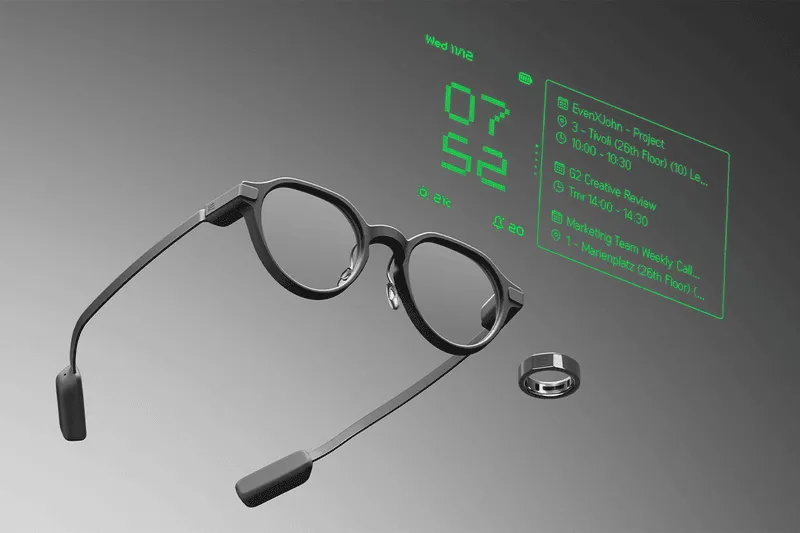
I wear glasses. I’m already wearing something on my face all day, so if it can show me a screen too, there’s no reason to say no. The G2 has no camera and no speaker; it shows information on a green Micro LED display inside the lens, and it weighs only 36g. It officially launched in Korea in August too, so I plan to buy one as soon as I get home.
But I didn’t want to sit around waiting with nothing to do on my trip, so I wanted to build the apps I’d use ahead of time. That’s where this project started.
Apps that run on the G2 are actually web apps
The G2 has Even Hub, an app store and developer platform in one. You can get the SDK and simulator from npm, so you can start developing right now even without the glasses. Perfect for me while I’m traveling.
Reading the docs, the structure turned out to be interesting. Even Hub apps are web apps built with web technologies. The Even Realities app installed on your phone loads my app in a WebView, and the Even app handles Bluetooth communication with the glasses for you. The app logic also runs on the phone, not the glasses. The glasses are just a screen and an input device.
For a web developer, that’s welcome news. Just add one SDK to Vite and you’re done.
By the way, everyone only talks about the resolution (640×350), so I looked up the refresh rate too: the panel is 60Hz. But from a developer’s point of view, that number doesn’t mean much. What actually sets how fast the screen updates isn’t the panel but how fast the phone sends data to the glasses over Bluetooth, and the SDK doesn’t support animation either. It’s better to think of the G2 not as a device for watching video but as a HUD you glance at for text that changes now and then.
So what did I want to build?
What I wanted to do with the glasses wasn’t anything grand.
- Turn the Tapo L535 bulbs in my home on and off
- Get KakaoTalk notifications and send messages
- Send email
- And something I thought of along the way: leave memos in my Obsidian notes
Going through them one by one, it wasn’t as smooth as I expected. KakaoTalk notifications need no development at all. The G2 already shows phone notifications, so you just turn on KakaoTalk notifications in the Even app. In fact, the SDK has no API for reading phone notifications, so you couldn’t build an app that processes them even if you wanted to.
Sending KakaoTalk messages was blocked by Kakao’s policy. “Send to me” can be used without limits, but “send to friends” requires the receiving friend to also connect to my app with Kakao Login and give consent, and even with permission, it’s capped at 20 messages a day to the same friend. Replying to any chat room you like is impossible with the official API. I cleanly gave up and decided to use only “send to me.”
Bulbs, email, and Obsidian could be built, but there was one catch.
In the end, you need a server
I said earlier that G2 apps run inside a WebView on the phone. That’s what trips you up. For an Even Hub app to send a request out, it has to pass two gates.
- The destination domain has to be on the network whitelist in
app.json, and - It has to pass the WebView browser engine’s CORS check.
And in production, only HTTPS works. That means sending commands directly to a bulb inside my home router at http://192.168.x.x is impossible. The official docs also say that for APIs whose CORS you can’t fix, you should call them through a server you run.
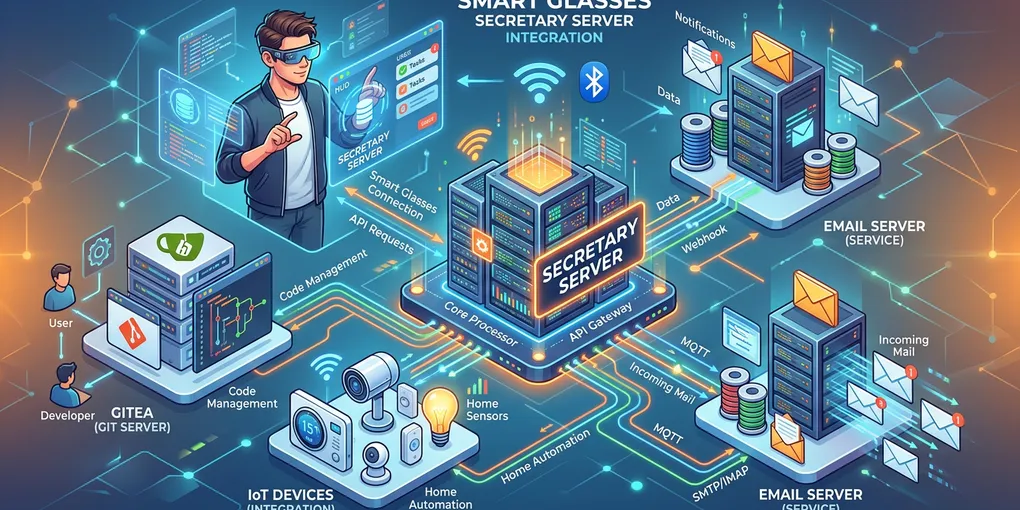
So the structure ends up like this.
Luckily, my home already has a server: a Synology NAS. It’s on 24 hours a day, it’s inside my home LAN so it can reach the bulbs directly, and it can run Docker. For bulb control, the unofficial Tapo library (tapo) supports the L535, so I can use that, and for email I can send through AWS SES, which I already use.
Obsidian was even easier. My vault is already synced via git with the Gitea I installed on the NAS. So the server can clone that repository, and when leaving a memo, commit and push. Obsidian on my Mac just pulls as usual and that’s it.
Wait, this isn’t a glasses app?
Once I’d laid it all out this far, something seemed odd.
Bulb control, sending email, Obsidian, Kakao: it’s all on the server. All the G2 app does is ask the server “turn off the lights” and show the result on screen. I started out to build a glasses app, but what I actually had to build was a server.
In that case, there’s no reason to tie it to the G2. I want to call it from my phone, and from my wrist too. My watch is an Amazfit, and when I looked into it, Zepp OS also has a mini-program development environment. The structure is almost the same as the G2. The watch app talks to the Zepp app on the phone over Bluetooth, and the Side Service on the phone calls external servers with fetch. These days AIs like Claude can call tools via MCP too, so telling an AI “turn off the living room lights” is also possible.
So I changed direction. Not a glasses app, but a secretary that handles everything in the house for me. Its name is Secretary.
Secretary is a service hub. It connects the IoT devices, mail server, and Git server in the house, and handles things on behalf of any client that sends a request. Each client only does what it’s good at.
- Flutter app (phone): The main app and admin console. It handles device registration and approvals.
- G2: Glanceable info and voice commands
- Watch: Quick actions like turning on lights, and tapping to approve
- MCP: When an AI gets work done for me
Set up this way, I can develop and try it out on my phone now, even before I have the G2. And if I get other devices later, I just attach one more client. Things got bigger than buying a pair of glasses, but I like this much better.
But opening a home server to the outside?
The problem is security. To use it on business trips and on the way home from work, Secretary has to be reachable from outside. This server can turn off the lights in my house, send email in my name, and edit my notes. Getting hacked would be way more than a little inconvenient.
Recently, while writing the Secure Infrastructure, Secure Coding post, I went on and on lecturing about “reducing the doors that let people in,” and now it’s my turn to apply that to my own home. After a lot of thought, I set the overall direction like this.
- Not a single NAS port is opened. Cloudflare Tunnel punches a tunnel from the NAS outward, and Cloudflare Access guards the front of it. Both are free for personal use.
- Each device gets its own key. Every request carries an HMAC signature, so an intercepted request can’t be reused.
- Risky actions are confirmed once more on another device. If the glasses request sending an email, it only actually goes out after a tap on the watch or phone.
But here I hit another snag. My domain is managed in AWS Route53, and Cloudflare’s free plan only lets you use Tunnel if you move the DNS for the whole domain to Cloudflare. Delegating just a subdomain is a Business or Enterprise plan feature. I didn’t want to move a domain loaded with SES email authentication records just for one home server, so I decided to buy a new domain just for Secretary. It’s the only part of this project that costs money.
Coming up next
To sum up, I set out to build a smart glasses app and ended up building a home secretary. The glasses won’t come until December, so until then I plan to build the server step by step. The series will probably go roughly like this.
- How It Started - this post
- Design - Authentication (HMAC signatures, device keys), Cloudflare Tunnel and Access, security design
- Server - Running the Secretary core on the NAS with Docker, SES email, and Gitea/Obsidian integration
- IoT - Connecting the Tapo bulbs after I get back
- Clients - Flutter app, G2 app, Amazfit watch, MCP
Plans can change at any time. This post itself is a story about plans changing, after all.
Bye for now!
Loading comments...