 THEREiS
Title :
Secure Infrastructure and Secure Coding for Security #1 - Infrastructure
This post is translated from the Korean original. Read in Korean →

Security incidents keep breaking out one after another these days. News of hacks never stops, and even banks that spend 120 billion won a year on security get breached. It even seems that tools people built by asking an AI to “make a tool that can penetrate this site for a security check” are being abused in real attacks.

We live in an age where security matters this much, yet ironically security keeps getting breached and my personal information has become a public good.
I’m a web developer and an application developer, someone who builds just about anything a client wants. Because of that, I’ve been through several messes cleaning up security issues together with clients, and thanks to that, I think I’m fairly sensitive about security.
So this time, I want to organize my thoughts on security in two parts. The first is infrastructure, and the second is coding.
Structurally, nobody gets in
These days my main job is building infrastructure and boilerplate. So every time I start a project, I think about how to make it structurally impossible for anyone to get in. In a recent project, I came up with this structure. Put just one Bastion server on EC2 and restrict who can access the Bastion. Build the rest of the servers on Kubernetes (EKS) so there’s no way at all to access EC2 directly, or, even if I do create EC2 instances, create them with AWS commands and lock them down so they can only be reached through the Bastion.
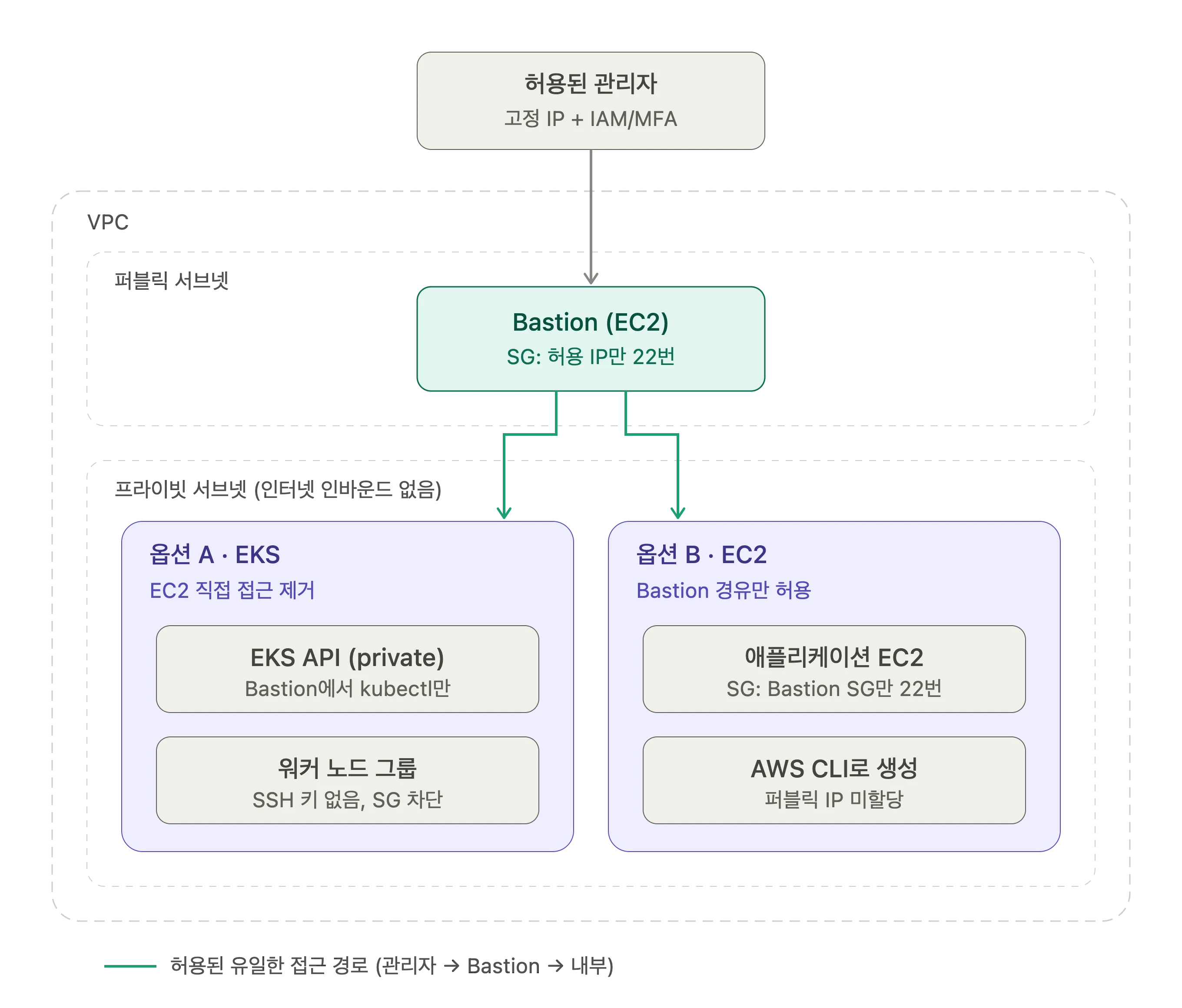
The key here is closer to “remove the door itself” than to “block it.” I don’t put SSH keys on the EKS worker nodes at all, and the only management allowed is calling kubectl from the Bastion against the private EKS API. If I have to use EC2, I create instances without a public IP and set the security group’s inbound source to the Bastion’s security group rather than an IP range. That way, any connection that doesn’t go through the Bastion simply can’t happen in the first place.
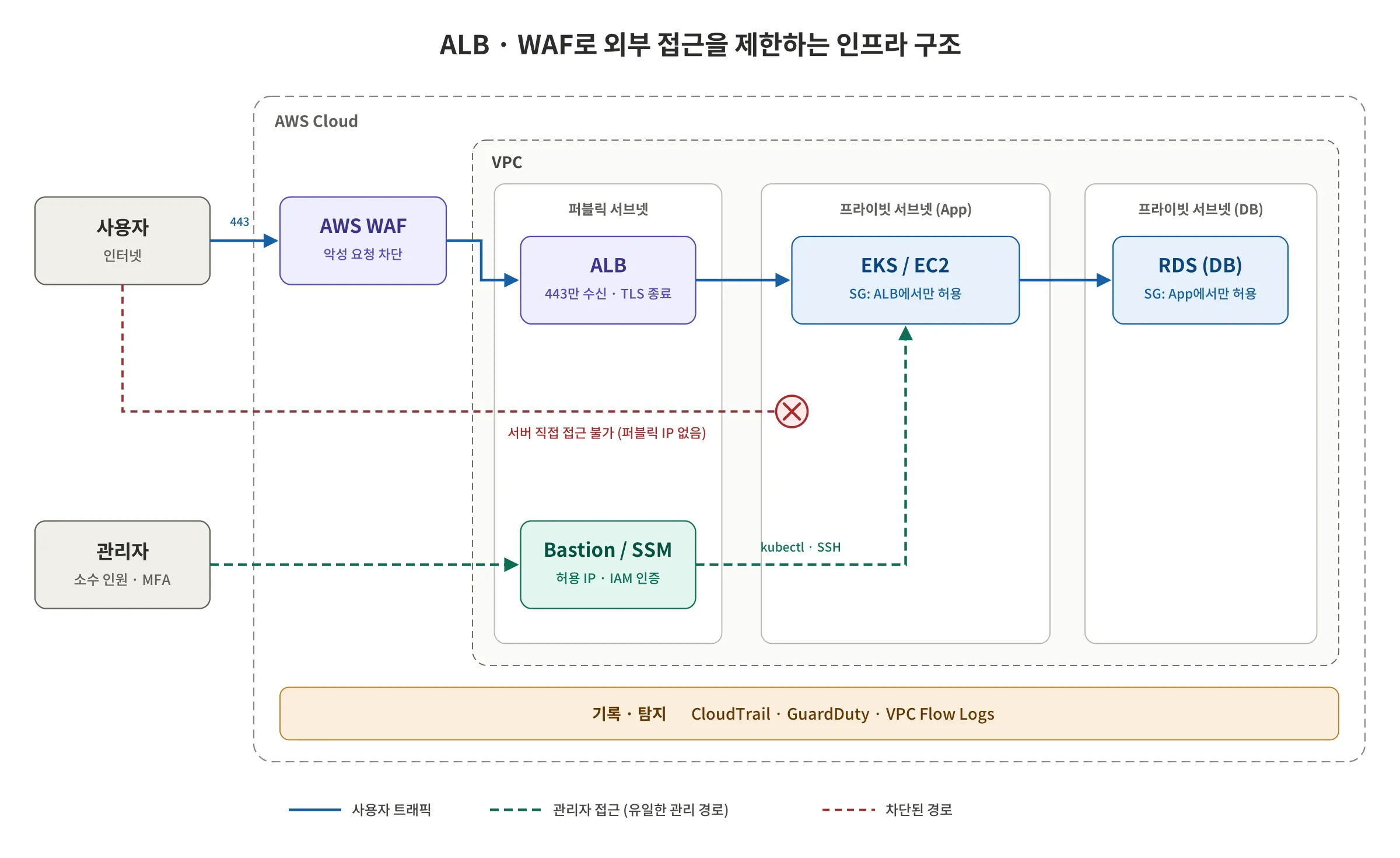
External users’ traffic follows the same principle. Instead of the servers receiving port 80 (HTTP) or 443 (HTTPS) directly, all servers sit in a Private Subnet and only the load balancer (ALB) in front receives external requests. If there’s room in the budget, I put a WAF in front of that too. The DB, likewise, is only reachable inside the Private Subnet, and only from the application servers, so it’s thoroughly isolated from the outside.
Take the name tags off your servers
Once you’ve cut down the doors, you also need to remove the name tags hanging on them. Web servers send far more information in response headers than you’d think. Poke any site with curl -I and you’ll see values like these surprisingly often.
HTTP/1.1 200 OKServer: nginx/1.18.0 (Ubuntu)X-Powered-By: Next.jsFrom just these two lines, you can tell the web server type and its exact version, the OS, and even the framework. All an attacker has to do is search for known vulnerabilities (CVEs) for that version. In fact, automated scanners roam the internet collecting headers like these and building lists of servers running vulnerable versions. The server is doing the attacker’s reconnaissance, the first stage of an attack, for free.
Of course, hiding headers doesn’t make vulnerabilities go away. The real fix is patching on time, and this is strictly a measure to avoid giving attackers hints. Still, there’s no reason to be so helpful. Here’s how I handle it in the setup I use.
- ALB: The ALB also adds a
Server: awselb/2.0header to responses. Set the ALB attributerouting.http.response.server.enabledtofalseto drop it. However, this setting only removes the ALB’s own header and passes through headers sent by the servers behind it, so you need to block them on the server side as well. - Next.js: Sends an
X-Powered-By: Next.jsheader by default. AddpoweredByHeader: falsetonext.config.jsand it goes away. - If you put Nginx in front: Hide the version with
server_tokens off;. The name “nginx” remains, but the version is no longer shown. - Spring Boot (embedded Tomcat): Watch out for error pages more than headers. The Whitelabel Error Page or a stack trace exposes even your internal package structure, and for errors handled at the Tomcat level, like malformed requests, the default error page sometimes prints the Tomcat version. Send error responses only in a fixed JSON format, and hide server info on Tomcat’s default error page with the
ErrorReportValvesetting.
module.exports = { poweredByHeader: false,};server.error.whitelabel.enabled=falseserver.error.include-stacktrace=neverserver.error.include-message=neverOnce the settings are done, check the headers of a normal response with curl -I, and also deliberately send requests to nonexistent paths or with a malformed format to confirm no version info leaks into the error responses. It happens more often than you’d think that normal responses are clean but the error pages leak information.
IAM matters too
Honestly, no matter how well you lock down the Bastion, anyone who can log in to the AWS console or holds an access key doesn’t need to go through the Bastion. They can just open up a security group, copy a snapshot, or launch a new instance. Real cloud security incidents start far more often from leaked access keys or misconfigured permissions than from someone breaking in over SSH.
So the principle of “only a few people can access the infrastructure” has to extend beyond the Bastion to IAM. Don’t use the root account, put MFA on every user, use SSO or temporary credentials instead of long-lived access keys, and grant dangerous permissions like ec2:RunInstances or modifying security groups only to people who truly need them. And manage that group of people rigorously.
Getting rid of the Bastion. Having a single door means you only have to break that one door
The moment the Bastion becomes the only entry point, it becomes the most attractive target from an attacker’s point of view. That’s why many setups these days use AWS SSM Session Manager so that not even port 22 on the Bastion is open. Inbound ports drop to zero, and a record of who connected when and what they did is kept automatically. In the end, “get rid of even the Bastion” is the next step for this architecture. If the budget allows, adding a dedicated access control solution follows the same idea.
You can’t block everything
The fact that even a bank that spent 120 billion won gets breached also means there’s no such thing as perfect blocking. So just as important as blocking is noticing quickly when you’ve been breached. Record every API call with CloudTrail, detect anomalies with GuardDuty, and log network flows with VPC Flow Logs, and even if an incident happens, you can trace when and where they got in. If you also restrict internal servers’ outbound traffic to only the places they need, then even if someone does get in, it becomes hard for them to get data out.
To sum up
In a word: limit the people who can access the infrastructure to a very small group, and make the rest of the servers very hard or outright impossible to access, even for that small group. That “access” must include not only SSH but also AWS accounts and permissions, and on the assumption that you can still get breached, you need logging and detection in place as well.
- Doors to a minimum: servers in a Private Subnet, external traffic through the ALB and WAF only
- Take off the name tags: don’t leak version info through headers like
ServerandX-Powered-Byor through error pages - Errors that keep quiet: 404, 403, 500 all return fixed messages only, stack traces go only to server logs
- People to a minimum too: Bastion (or SSM) and IAM permissions for only a few
- Prepare for a breach: record and detect with CloudTrail, GuardDuty, and Flow Logs
- Inconvenient, but only one path: don’t give anyone a reason to go around it
Because if access is inconvenient, hacking will be inconvenient too.
But no matter how tightly you lock down the infrastructure, beyond the port 443 you’ve left open to the outside lies the code we wrote. One line of SQL injection, one unvalidated input, and they walk right through this whole structure via the front door. In the next part, I’ll cover that code: secure coding.
Bye for now!

Loading comments...