 THEREiS
Title :
About HTTP/3 and QUIC
This page was translated from the Korean original using AI. If anything reads oddly, please refer to the original. Read the Korean original →
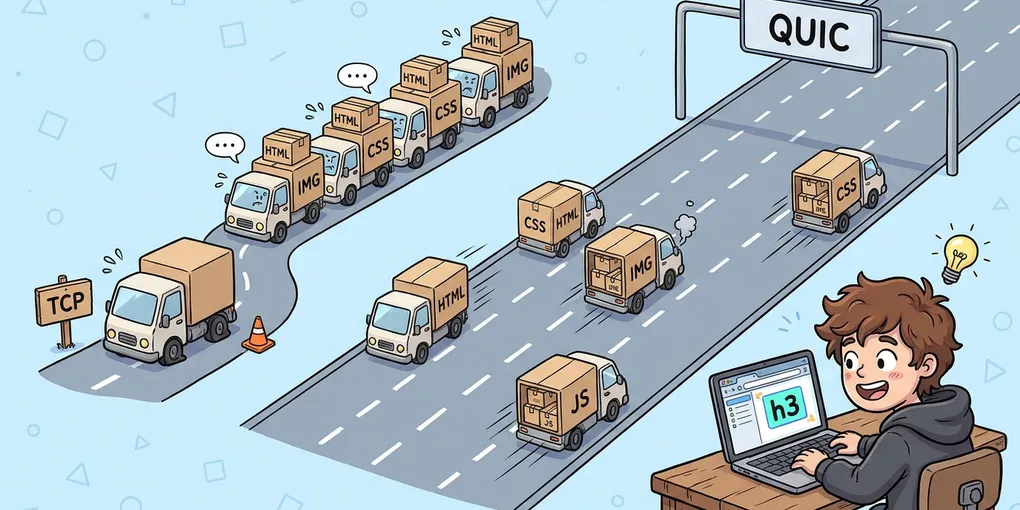
I heard there’s a protocol called HTTP/3 now. I haven’t even fully figured out HTTP/2 yet, and now there’s HTTP/3. What is this, and what’s this QUIC (pronounced “quick”) thing that moved into the spot TLS and TCP used to hold up? Blink once and something new comes pouring out.
I read someone’s explanation, and it turns out HTTP/3 is an HTTP that threw away the TCP that HTTP/1.1 and HTTP/2 ran on, and filled the gap with something called QUIC. I wondered if that even made sense, but browsers support HTTP/3, so I guess it does.
I don’t know much, but I’m going to study it my own way and write it down. I’m writing this for people who don’t know the topic either, so there are a lot of explanation boxes. If you need them, open the folded “Wait, what’s ○○?” boxes. If you already know, just skip past.
Wait, what’s a protocol?
A set of rules computers agree to follow when they talk to each other. Promises like “say hello first, ask questions in this format, answer in this format.” Just as people start a phone call with “Hello?”, computers need a fixed order and format to understand each other.
Let’s Start with HTTP
Wait, what’s HTTP?
HyperText Transfer Protocol. The protocol that defines how a browser asks a web server “give me this page” and how the server answers “here you go.” When you type an address starting with https:// into the address bar, that means “let’s talk over HTTP.” (The s means it’s encrypted (Secure), which comes up again below.)
HTTP has changed in a big way three times so far.
| Version | Year standardized | Transport underneath | One-line summary |
|---|---|---|---|
| HTTP/1.1 | 1997 | TCP | Sends human-readable text back and forth |
| HTTP/2 | 2015 | TCP | Mixes several requests over one connection |
| HTTP/3 | 2022 | QUIC (on UDP) | Swapped out the transport itself |
The column to look at is the second from the right. HTTP/1.1 and HTTP/2 both run on TCP, but only HTTP/3 runs on QUIC, which sits on UDP.
Wait, what are TCP and UDP?
Both are transport protocols that carry data to the other computer. They have opposite personalities.
- TCP (Transmission Control Protocol): careful registered mail. The receiver confirms “got it,” anything lost along the way gets resent, and everything is delivered in exactly the order it was sent. The catch is that all those steps make it slow.
- UDP (User Datagram Protocol): flyers tossed out. No confirmation, nothing resent if it’s lost, no care about order. Because there are no steps, it’s fast.
A web page can’t lose even a single character, so of course we’ve been using TCP all along. And yet HTTP/3 picked UDP.
What Changed in HTTP/3 Isn’t HTTP, It’s What’s Underneath
Networking is built in stacked layers. The bottom carries the data, the layer above encrypts it, and at the top HTTP says “give me the page.”
Wait, what’s a layer?
Network functions split up by role and stacked on top of each other. Here’s a parcel delivery analogy.
- IP: the layer that reads the address and finds the way to the right neighborhood and building
- TCP / UDP: the layer that decides how to pack the box and what to do if it gets lost (transport layer)
- TLS: the layer that puts a lock on the box (encryption)
- HTTP: the letter inside the box, i.e. “give me this page,” “here you go” (application layer)
Each layer only trusts the layer right below it. So you can swap out a lower layer without the upper layer having to care much.
In the diagram, HTTP/2’s two layers, TLS + TCP, are merged into a single QUIC layer in HTTP/3, and below that, TCP is replaced by UDP. Just remember HTTP/3 = HTTP running on QUIC.
A Closer Look at HTTP/3
It Says the Same Things
Luckily, for developers HTTP/3 isn’t unfamiliar. Methods like GET and POST, headers like Content-Type, status codes like 200 and 404, even cookies are all the same. That’s because every version shares a common spec (RFC 9110) that defines what HTTP “means.”
So whether it’s Spring Boot or Express, there’s almost nothing to touch in your application code. Once the web server or CDN turns on HTTP/3, you’re done. This is also why HTTP/3 was able to spread so quickly.
Wait, what’s an RFC?
Request For Comments. Documents published by the IETF (Internet Engineering Task Force), the body that sets internet technology standards. They’re numbered, and you can think of them as the official manual for “this is how the internet works.” HTTP/3 is RFC 9114, and QUIC is RFC 9000.
Wait, what’s a CDN?
Content Delivery Network. A service that puts servers all over the world and sends files from whichever server is closest to the user. Cloudflare, AWS CloudFront, and Akamai are well-known examples. A user in Korea doesn’t need to reach a server in the US; they get the files from a CDN server in Seoul, so it’s fast.
But the Way It Talks Got Lighter
Because HTTP/2 runs on TCP, HTTP/2 itself had to handle mixing multiple requests together, controlling the sending speed, and cancelling requests midway. So HTTP/2 had a lot of frame types for those jobs.
HTTP/3 hands all of that off to QUIC underneath. What’s left in HTTP/3 is a lean set of frames: DATA for data, HEADERS for headers, SETTINGS for announcing settings, and GOAWAY for “I’m going to close this connection now.”
Wait, what’s a frame?
Starting with HTTP/2, messages aren’t sent as plain text; they’re cut into small units with a fixed format. Each unit is a frame. Each one is tagged with a type, like “this frame is a header” or “this frame is body data.” Harder for people to read, but much faster for computers to process. This approach is called a binary protocol.
One Request = One Stream
In HTTP/3, every request opens one QUIC stream. The request goes out on that stream, the response comes back on the same stream, and then it’s closed. If a page has 20 images, 20 streams flow at the same time inside one connection. (Running several streams over a single connection like this is called multiplexing.)
Wait, what are streams and multiplexing?
If a connection is a highway, a stream is a lane on it. You lay down several lanes (several streams) on one highway (one connection) and send HTML, CSS, and images in their own lanes at the same time.
This technique of mixing several flows over one connection is called multiplexing. HTTP/1.1 couldn’t do it, so browsers opened up to 6 separate connections, and multiplexing arrived with HTTP/2.
At this point you might be thinking, “Didn’t HTTP/2 already do that?” Yes, it did. The difference is whether the lanes are really separate, and we’ll come back to that after looking at QUIC.
Header Compression Was Rebuilt Too: QPACK
Every HTTP request carries similar headers. Send 100 requests to the same site and you’re sending headers like User-Agent and Cookie 100 times over. So HTTP/2 compressed headers using a scheme called HPACK.
Wait, what’s header compression?
The browser and server each keep a copy of a “frequently used headers table,” and instead of sending a whole header, they send just a number like “table entry 7.” A header seen for the first time is sent in full and added to the table, and from then on it’s referred to by number.
But HTTP/3 couldn’t use HPACK as is, so it got a new one called QPACK (RFC 9204). Why it had to happen only makes sense once you know QUIC, so let’s untangle that later too.
How Does the Browser Know the Server Supports HTTP/3?
HTTP/3 uses UDP. But you can’t tell from an https:// address alone whether a server supports HTTP/3. So there are two ways.
1. The Alt-Svc header tells you. At first the browser connects over TCP as usual. Then the server attaches something like this to the response headers.
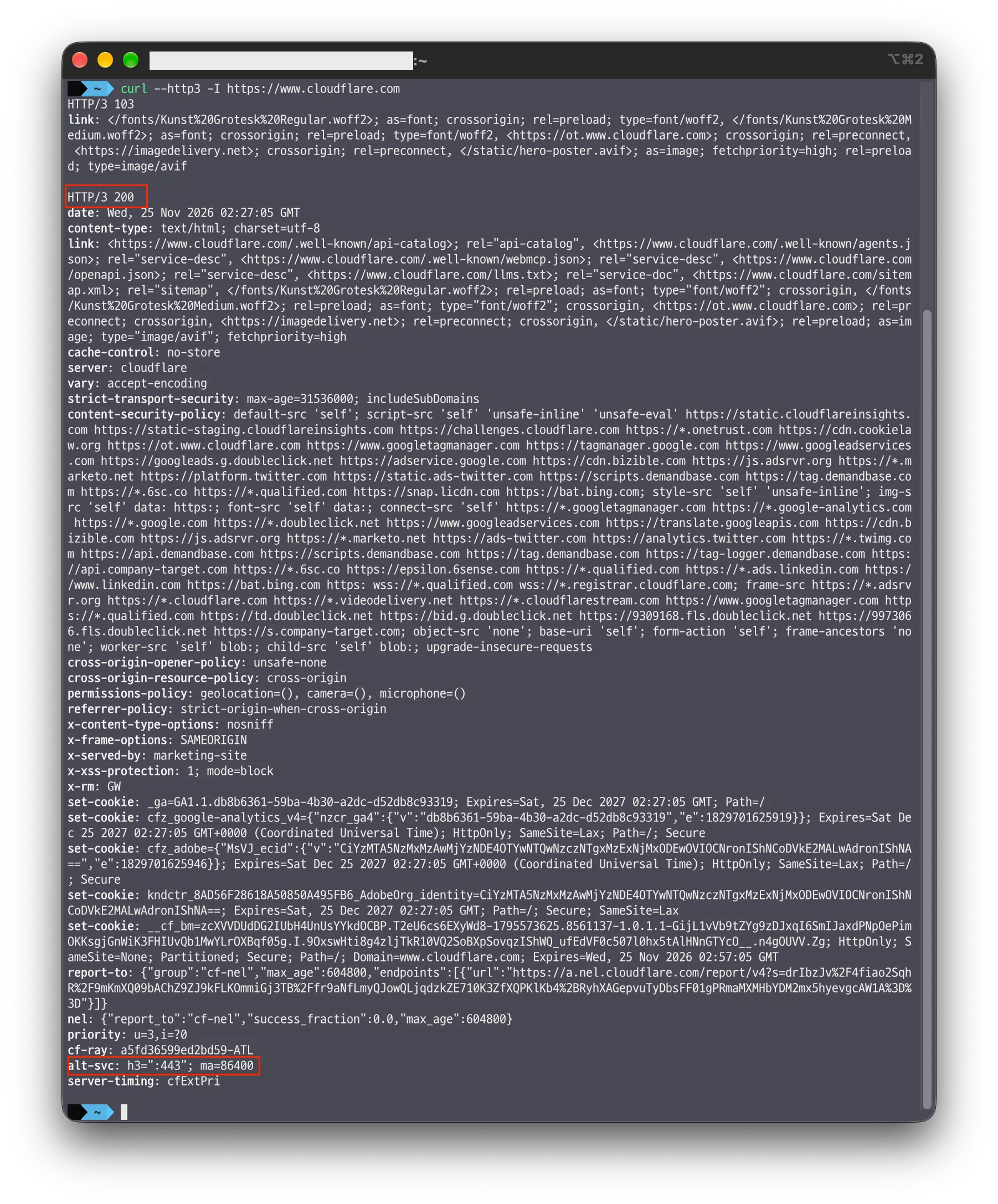
alt-svc: h3=":443"; ma=86400It means “I also speak HTTP/3 (h3) on port 443. Remember this for a day (86400 seconds).” From the next request on, the browser switches to HTTP/3. In other words, the first connection isn’t HTTP/3.
2. DNS tells you up front. If you register an HTTPS record (RFC 9460) in DNS, the browser already knows “this server does h3” at the address lookup step. Then it can start with HTTP/3 from the very first connection.
Wait, what’s DNS (Domain Name System)?
The internet’s phone book. People remember names like google.com, but computers need to go to an IP address like 142.250.x.x. When the browser asks DNS “what’s the address for google.com?”, DNS answers with the IP address. The HTTPS record is what lets it hand over extra info along with the address, like “this server also does HTTP/3.”
Wait, what’s a port?
If an IP address is a building’s address, a port is the unit number in that building. Many programs on one computer talk over the network at the same time, so they’re told apart by number. By convention, the web uses port 80 for HTTP and 443 for HTTPS. HTTP/3 also uses 443, but UDP 443, not TCP 443.
A Feature That Disappeared: Server Push
HTTP/2 had a feature called Server Push. When the browser requested HTML, the server would say “you’ll need the CSS anyway, right? Let me send it ahead” and push files that were never requested. It was great in theory, but in practice almost nobody managed to use it well. There was a lot of waste, like re-sending files that were already in the browser cache.
In the end, when Chrome announced in 2020 that it would drop Server Push support, it also said it doesn’t support it at all for HTTP/3 and has no plans to add it. It’s still in the HTTP/3 spec, but it’s effectively gone. In its place, a status code called 103 Early Hints is filling the gap. The server just gives a hint first, “you’ll probably need these files soon,” and the browser decides on its own whether to actually request them.
QUIC Inside
Now let’s look at QUIC, which sits under HTTP/3.
QUIC is a protocol Google started as an internal experiment around 2012. Originally the name was short for Quick UDP Internet Connections, but when the IETF polished it into a standard, they settled that “QUIC isn’t an acronym, it’s just a name.” These days you just read it as “quick.” (They sure are good at naming things.) It became a standard as RFC 9000 in May 2021.
Here’s QUIC in one line.
“A protocol that rebuilds what TCP did on top of UDP, and folds TLS encryption in as well”
Why Build It on UDP, of All Things?
If you’re unhappy with TCP, why not just fix TCP? You can’t. TCP has been around so long and spread so widely that it’s become impossible to fix.
First, TCP lives inside the operating system’s kernel. To fix TCP, every Windows, Mac, Linux, Android, and iOS machine in the world would need an update. That takes years, more like a decade or more.
Wait, what are the kernel and user space?
The kernel is the heart of the operating system. It directly handles hardware like memory, CPU, and networking, so it’s a core area you can’t change casually; it only changes with an OS update.
User space is where the apps we install (browsers, web servers, and so on) run. An app update is all it takes to change things there.
TCP lives in the kernel, while QUIC lives in user space (inside programs like Chrome and nginx). So QUIC can get new features with a single browser update.
Second, the countless devices in the middle of the internet (middleboxes) look into TCP headers and block or mangle anything that isn’t “the TCP shape I know.” Even if you add a new feature to TCP, these devices don’t understand it and block it. This phenomenon, where a protocol hardens until it can’t be changed, is called ossification.
Wait, what’s a middlebox?
Middlebox is the umbrella term for network devices sitting between my computer and the server: routers (NAT), company firewalls, carrier equipment, load balancers, and so on. They pick apart TCP headers in the name of inspecting and optimizing traffic, and that gets in the way of TCP ever changing.
So QUIC came up with a trick. UDP is a thin shell with almost no features, so most middleboxes just let it through. Pack QUIC inside a UDP box and, to a middlebox, it just looks like UDP. And the work TCP used to do, QUIC does itself in user space.
What QUIC Does Itself
UDP does nothing for you, so QUIC handles everything TCP used to handle on its own.
- Resending lost packets (reliability)
- Putting things in order (but per stream, not across the whole connection)
- Congestion control (slowing down when the network gets jammed)
- Flow control (only sending as much as the receiver can handle)
- And on top of that, encryption, which TCP never had
Wait, what’s a packet?
When data is sent over a network, it isn’t sent as one big chunk; it’s cut into small pieces. Each piece is a packet. It’s like taking furniture apart when you move and splitting it across several boxes. The receiver gets all the boxes and puts it back together.
Wait, what’s congestion control?
If the road is jammed and you keep pushing more cars onto it, it gets worse. Networks are the same: when packets keep getting lost, the sender thinks “the road must be jammed” and slows down, and when things go smoothly it gradually speeds up. That’s congestion control. There are several algorithms, like CUBIC and BBR. TCP lives in the kernel, so the algorithm is hard to change, but with QUIC each app can pick its own.
Encryption Is Built In
QUIC put TLS 1.3 right inside the protocol. In QUIC, encryption isn’t an option you turn on or off; it’s mandatory. Unencrypted QUIC doesn’t exist.
Wait, what are TLS and HTTPS?
TLS (Transport Layer Security) is a protocol that encrypts what’s being communicated. It puts a lock on it so nobody in the middle can snoop or change the contents.
HTTPS is HTTP encrypted with TLS. That’s the lock icon in the address bar. TLS 1.3 is the latest version, released in 2018, and it’s faster and safer than earlier versions.
On top of that, QUIC encrypts not just the data but most of the header too. TCP’s headers are fully exposed, so middleboxes peeked in and meddled, but with QUIC there’s almost nothing to peek at. This is about security, but it’s also a statement that “QUIC won’t get hardened by middleboxes going forward.” In other words, it won’t repeat TCP’s mistake.
Connections Are Identified by an ID, Not an IP Address
TCP identifies a connection by four values: source IP, source port, destination IP, destination port. If any one of them changes, it’s treated as a different connection.
QUIC gives each connection a unique number called a Connection ID. Even if the IP address changes, the same Connection ID means the same connection. Why that’s good comes up right next.
Wait, does an IP address actually change?
More often than you’d think. If you’re watching YouTube on Wi-Fi at home and step outside, you switch to LTE, and your IP address changes. The address your Wi-Fi router gives you and the one your carrier gives you are different. Same thing when you keep dropping on and off café Wi-Fi.
So What Got Better?
Now that we’ve seen both HTTP/3 and QUIC, let’s sum up what actually got better.
1. Connecting Got Faster
To get a web page, you first have to exchange greetings with the server: “Let’s connect.” “Sure.” This is called a handshake.
Wait, what’s a handshake?
A handshake is exactly what it sounds like. Before really exchanging data, both sides check with each other: “Want to connect?” “Sure.” “Okay, let’s start.” RTTs get burned in the process.
Wait, what’s RTT?
RTT (Round Trip Time) is the time it takes for a signal I send to reach the other side and come back. From Seoul to a server in the US, RTT is around 150ms. Every round trip in a handshake means waiting one RTT. So cutting the number of round trips is the same as gaining speed.
HTTP/2 has to do the TCP handshake and the TLS handshake separately. That’s two round trips before it can send a request.
QUIC does the connection greeting and the encryption greeting in one go. One round trip and it can send a request.
If it’s a server you’ve connected to before, it’s even faster. Using info saved from last time, it can put the request right into the very first packet. This is called 0-RTT.
For an overseas server with a 150ms RTT, every round trip you cut saves 0.15 seconds. Doesn’t sound like much, but it adds up every time you open an app or move to another page, and you can feel it. In fact, the delivery service Delivery Hero announced at P99 CONF 2026 that after moving their app to HTTP/3, the time to establish a secure connection dropped by 51%.
0-RTT has a weakness too
The first request sent with 0-RTT is vulnerable to a replay attack. If someone intercepts that packet and sends the exact same thing to the server again, the server might process the same request twice.
So 0-RTT is usually only used for requests that give the same result no matter how many times they run. Viewing a page (GET) twice is fine, but if “send money” (POST) runs twice, you’re in big trouble.
This property of giving the same result no matter how many times you run it is called idempotency.
2. Losing One Packet Doesn’t Stop Everything
This is the “are the lanes really separate” story I put off earlier.
HTTP/2 also mixes several streams over one connection. The problem is that the TCP underneath has no idea what a stream is. To TCP, HTML or image, it’s all just bytes lined up in a single row. And TCP’s rule is to deliver everything in exactly the right order.
So here’s what happens. One packet of image A gets lost along the way. Until TCP gets that packet again, it holds on to every packet that arrived after it and waits. That’s HOL blocking. Image B, the CSS, and the JS arrived just fine, but they all stop because of image A.
Wait, what’s HOL blocking?
Head-of-Line Blocking: “the front of the line is stuck, so everything behind it stops.”
Think of a supermarket checkout line. If the customer at the front holds things up with an item whose barcode won’t scan, everyone behind them has to wait too, even if they only came to buy one thing.
HTTP/2 painted several lanes on the highway, but the actual road (TCP) had just one lane. The lanes were only paint, so when the car in front stopped, everything stopped.
QUIC separates streams for real. It puts things in order per stream, not across the whole connection. If a packet of image A is lost, only image A waits, and image B, the CSS, and the JS are passed straight to the browser. Now the lanes are finally real lanes.
The effect is especially big where packet loss is frequent, like LTE on the subway or weak Wi-Fi. In environments with almost no loss, like wired internet, there’s not much difference.
The QPACK Story I Put Off Earlier
Now we can see why HTTP/3 had to build new header compression.
HPACK works by updating the “frequently used headers table” that the browser and server share. But those updates must arrive in the order they were sent for it to work properly. TCP guarantees order, so that was no problem.
QUIC, however, doesn’t guarantee order between streams. Stream 1 might send “add this header as table entry 62,” but stream 2’s “use table entry 62” could arrive first. Then stream 2 has to wait for stream 1. The HOL blocking we worked so hard to get rid of comes back because of header compression.
So QPACK sends table updates separately on a dedicated stream, and lets you set “at most how many streams are allowed to stall waiting for updates.” Developers can choose between stronger compression and less waiting.
It’s a good example of how changing the lower layer (the transport layer) also breaks the assumptions of the design built on top of it.
3. Switching from Wi-Fi to LTE Doesn’t Drop the Connection
With TCP, the connection breaks when the IP address changes. If you’re downloading a big file on Wi-Fi at home and switch to LTE the moment you walk out the front door, the connection has to be set up again from scratch. The handshake too.
QUIC identifies connections by Connection ID, so even if the IP address changes, it goes “ah, that’s the connection from before” and carries on. This is called connection migration. Video calls and streaming drop less when the network changes.
Going one step further, Multipath QUIC, which uses Wi-Fi and LTE at the same time, also became a standard in 2026 as RFC 10069. Basic QUIC uses one path at a time, but with this extension, data can be sent over several paths at once.
4. Encrypted by Default
HTTP/1.1 and HTTP/2 could be used without encryption. (Though browsers only supported HTTP/2 over encrypted connections.) With HTTP/3, QUIC itself doesn’t work without encryption, so it’s always encrypted. Since most of the header is encrypted too, there’s far less for anyone in the middle to see.
5. It Can Keep Evolving
QUIC lives in user space and its headers are encrypted, so there’s less worry about it hardening the way TCP did. That’s why new technologies keep being built on top of it.
- WebTransport: an API for sending multiple streams and fast datagrams over HTTP/3 from the browser. It’s seen as the next-generation alternative to WebSocket. With Safari 26.4 adding support in March 2026, it’s now available in every major browser. That said, the server-side ecosystem is still immature. (Now I can add one more row to the comparison table in my last SSE post.)
- MASQUE: a technology that carries UDP traffic wholesale inside an HTTP/3 connection. Privacy services like Apple’s iCloud Private Relay use it.
That Doesn’t Make It a Silver Bullet
If it were all upside, everyone would’ve been using only HTTP/3 long ago.
The first connection is still often TCP. As we saw, browsers mostly learn about HTTP/3 support through the Alt-Svc header. According to Firefox stats, about 84% of connections to servers that support HTTP/3 learn that only through Alt-Svc. In other words, they connect over TCP once before switching to HTTP/3. Using a DNS HTTPS record can reduce this problem.
It eats more server CPU. TCP has been optimized in the kernel for a long time, and network cards even take over some of the work. QUIC encrypts and processes every packet in user space, so it uses more CPU. Big companies are narrowing the gap with various optimization techniques.
Some networks block UDP. Some company or school networks block UDP 443 as a security policy. Then the browser quietly falls back to HTTP/2 (TCP). The user never notices, but they don’t get any HTTP/3 benefit either.
On a good network, the difference is small. HTTP/3 shines where latency is high and packet loss is frequent. On a beefy wired office connection, you might barely feel a difference from HTTP/2. The Delivery Hero case above didn’t get better just by flipping a switch, either; apparently they put in quite a bit of work.
Still, adoption has come a long way. According to W3Techs, as of March 2026 about 38% of all websites use HTTP/3, and narrowing it to sites on Cloudflare, it’s close to 90%. Chrome, Firefox, Safari, and Edge all support it by default. It’s not future tech anymore; it’s just current tech.
Let’s Check It Ourselves
In the Browser
In Chrome, press F12 (Cmd + Option + I on macOS) to open DevTools and go to the Network tab. Right-click the column header row of the table and check Protocol. Then visit https://www.google.com or https://cloudflare.com.
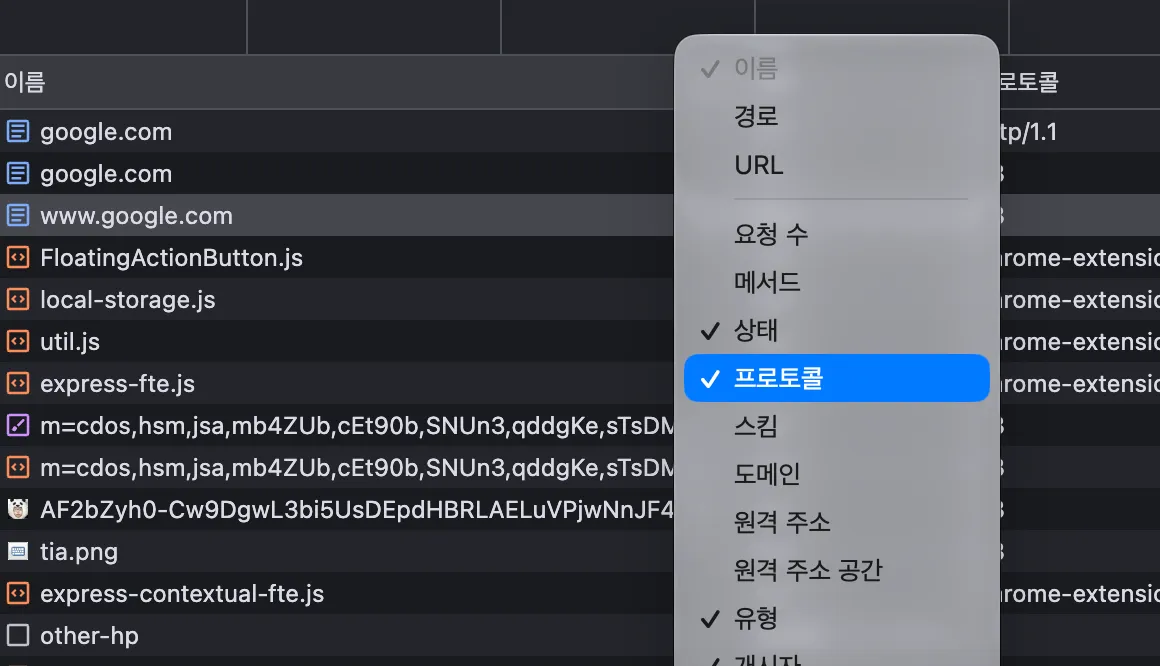
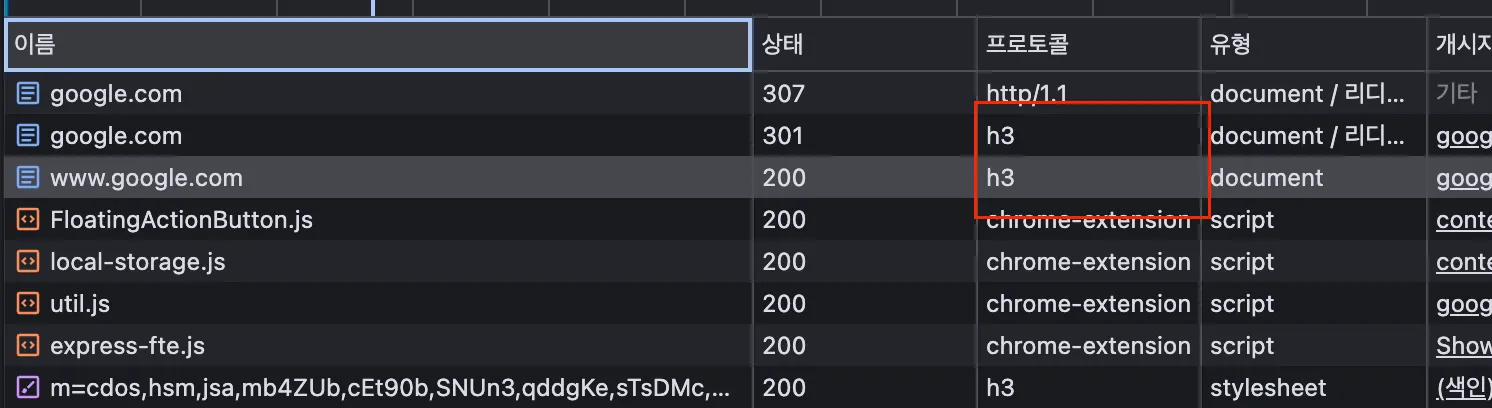
If the Protocol column shows h3, the communication went over HTTP/3. You might also see it show h2 on the first visit and switch to h3 after a refresh. That’s the switch after learning about it through Alt-Svc I mentioned earlier.
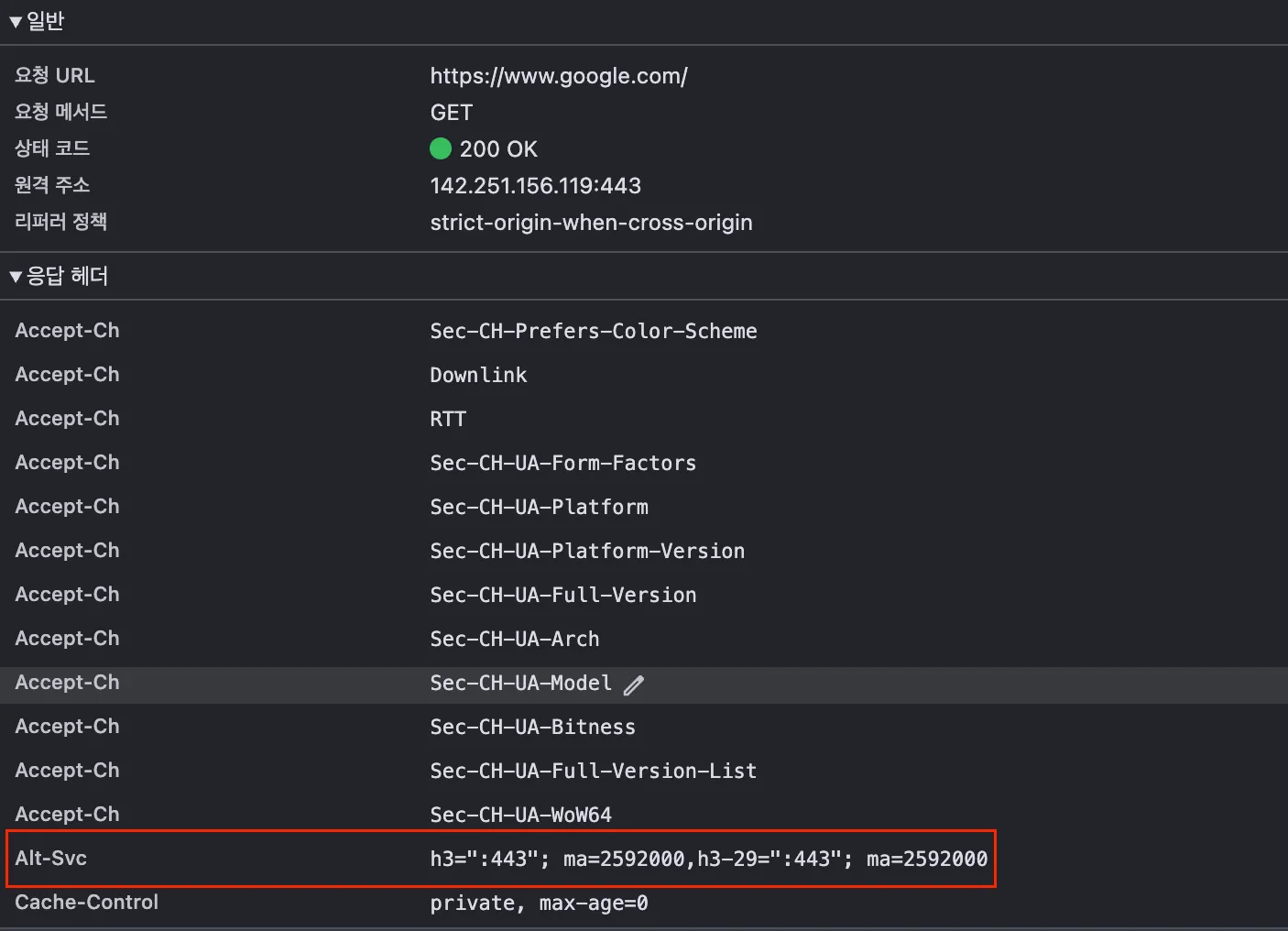
You can also see h3 in the Alt-Svc response header.
In the Terminal
You can check with curl too. But it has to be a curl built with HTTP/3 support. Run curl -V first and check whether HTTP3 is on the Features: line.
curl --http3 -I https://www.cloudflare.comIf the first line of the response is HTTP/3 200, it worked.
To Sum Up
| HTTP/2 | HTTP/3 | |
|---|---|---|
| Transport protocol | TCP | QUIC (on UDP) |
| Encryption | TLS added on separately | TLS 1.3 built into QUIC, mandatory |
| Round trips to connect | 2 RTT | 1 RTT (0 RTT on reconnect) |
| When one packet is lost | Every stream stops | Only that stream stops |
| When the network changes | Connection drops | Carries on with the Connection ID |
| Header compression | HPACK | QPACK |
| Where it lives | OS kernel | App (user space) |
In one line: HTTP/3 keeps HTTP’s way of talking as is, and swaps the truck that carries those words from TCP to QUIC. And that truck starts faster, has truly separate lanes, and doesn’t stop even when the road changes.
While putting this together, I realized how shallow it was to have only memorized “UDP is an unreliable protocol.” Because it’s an unreliable shell, you can build anything new on top of it.
Next time, I’m thinking of actually turning on HTTP/3 in Spring Boot or nginx. That’s it for today, bye!

References
- RFC 9114 - HTTP/3 (IETF)
- RFC 9000 - QUIC: A UDP-Based Multiplexed and Secure Transport (IETF)
- RFC 9001 - Using TLS to Secure QUIC (IETF)
- RFC 9204 - QPACK: Field Compression for HTTP/3 (IETF)
- RFC 9460 - SVCB and HTTPS Resource Records (IETF)
- RFC 10069 - Managing Multiple Paths for a QUIC Connection (IETF)
- Intent to Remove: HTTP/2 and gQUIC server push (Chromium blink-dev)
- Usage statistics of HTTP/3 broken down by reverse proxy services (W3Techs)
- WebTransport API (MDN)
- HTTP/3 is faster with some work and help from Cloudflare (DevClass)
Loading comments...